


xXx_Ape_xXx
-
Posts
305 -
Joined
-
Last visited
-
Days Won
11
Content Type
Profiles
Forums
Blogs
News
Store
Everything posted by xXx_Ape_xXx
-

Replace specific materials in chiselled blocks?
xXx_Ape_xXx replied to starfarer's topic in Questions
You're welcome! Glad to help -
Replace specific materials in chiselled blocks?
xXx_Ape_xXx replied to starfarer's topic in Questions
You could use the paintbrush from QP Chiseltools to help with that. Great set of tools to use, even in creative mode. -
Welcome to the game and forums my fellow viking May your days be short and filled with much joy to come
-
Lead early game tools- mod commissions?
xXx_Ape_xXx replied to Bada's topic in [Legacy] Mods & Mod Development
Considering how malleable and soft lead is, it wouldn't make much sense to make tools from it. Maybe other stuff, but tools? -
Flowers as ore indicators - issue with surfaceBlock
xXx_Ape_xXx replied to Wahazar's topic in [Legacy] Mods & Mod Development
You'd get faster replies if you ask your question in the #mod-development channel on the official discord. -
Would love to see more in-depth metalworking in the game, I'm all in for this idea
-
Suggestion - Having Pause Actually Pause Your Game
xXx_Ape_xXx replied to Bach_Treebane's topic in Suggestions
@Thorfinn Hm never had that happen to me, strange, almost like the time doesn't stop even tho it says paused. -
Suggestion - Having Pause Actually Pause Your Game
xXx_Ape_xXx replied to Bach_Treebane's topic in Suggestions
If playing on a server, it does not pause the game.. in single player, it does pause the game. -
Here's a teaser pic from last week... they are working on a lot of exciting stuff for the next big update (1.20) Would recommend following the dev-log on the official Discord, as they release teasers to upcoming additions and what they are currently working on quite regularly
-
Welcome to the game! The reed chests are for ground storage, not for extending the inventory of the player. You need to make the reed baskets for this purpose
-
The main issue I see happening, is the auto clicker is spamming clicks, while we click and hold the button to dig/mine. I've been trying to find a similar program that has a "hold" mode when clicking, but no luck so far. I found one tho, but that program didn't work inside the game at all.
-
@LadyJade90 Hi again. I'm sorry but I can't reproduce the problems you're having with the auto clicker software and the game. I can lower my setting all the way down to 1ms with no issues, game still works fine and I can move around as normal. I am however unable to use the program to dig, no matter how low I set the interval between clicks, so this might not be the solution for your digging plans. I'm sorry I can't be of more help.
-
@LadyJade90Could you show the settings you're using in the auto clicker interface? I can try to reproduce the issues your having and see if I can find a solution that works.
-
Remove Knockback from Starvation and Falling Damage
xXx_Ape_xXx replied to ifoz's topic in Suggestions
@LadyWYT I can tell you what happens on a laggy multiplayer server: You get slung several meters in whatever direction you happen to be moving at the moment the knockback happens, often resulting in your char ending up in totally unintentional places. Now just place a deep hole or edge next to you when this happens and we got a flight to Neverland -
Looks like the texture atlas needs some adjustments, but I think that should be self adjusting now
-
Anyone here doing custom mods to order?
xXx_Ape_xXx replied to SharkGunner's topic in [Legacy] Mods & Mod Development
Give some more info for what you're looking for, and you might get more replies/interest -
Here you go: Unleaded windows Enjoy
-
Remove Knockback from Starvation and Falling Damage
xXx_Ape_xXx replied to ifoz's topic in Suggestions
I back this suggestion 100% !! The knockback is totally pointless and very annoying! I've been killed several times on our multiplayer server because of the knockback. Please remove this utterly useless "feature"! -
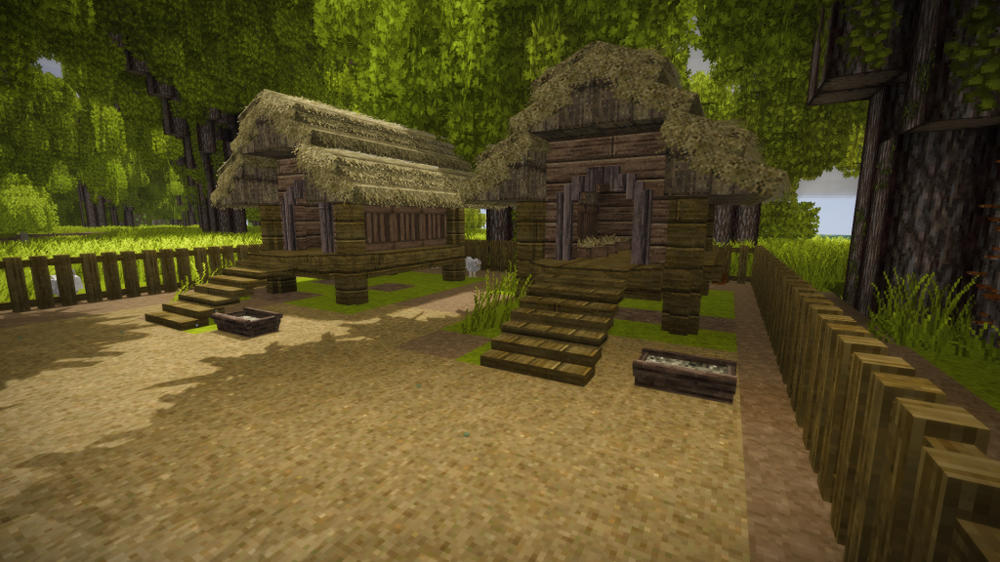
Here's a chicken coop I built for our server, with 3 hen boxes in each Works great, and easy access for eggs trough the trapdoors
-
That ruin still spawn, we have it on our 1.19.7 world, but I think its very rare. Only found 1 of them so far, and I've explored A LOT.
-
@BaconQueen Again, it would be a lot easier to guide you in the correct path, if we knew what mod you wish to update. Some mods are just json files, and very simple to update, while other mods are coded mods, and can be much harder and difficult to update, and many mods are a combination of the two.
-
What mod is it, and is there a version of the mod for that specific version of the game already on the modlist? If it's not updated or maintained by the author of the mod, there's no guarantee it will ever get updated to what ever version the game is currently at.
-
Extensive guide or explanation of the chiseling system
xXx_Ape_xXx replied to xXx_Ape_xXx's topic in Discussion
@Silent Shadow Thank you very much, sir! I had no idea I could add wallpapers to chiseled blocks, let alone linen How do you add linen to the block?? Much appreciated information, I will experiment with this for sure -
lol after that many hours, your mind might play tricks on you Tho, I too swear I have seen such shadowy figures when moving about... I've just assumed they'd be some lost drifter or animal
-
Extensive guide or explanation of the chiseling system
xXx_Ape_xXx replied to xXx_Ape_xXx's topic in Discussion
Appreciate the reply, and outlining the basic functions, but it's not quite what I was asking or hoping for. I apologise, I should maybe have worded my question a bit different, but english isn't my first language. I'm well aware of all what you mentioned in your post, and have done a fair bit of chisel work on various worlds and serves. You can see some of my work here. The type of information I seek, let me give an example: Did you know you can change the direction of texture of added materials to a chisel block? This is done by placing, lets say, a wood plank block, in the direction you want the grains to go, then right click it with the chisel, break it and then add it as a second block in your crafting grid with the host block you want to add the wooden texture to. This way your wooden texture in the block you're chiseling, will go in the direction you want it, and not in the "default" direction. This type of info was all new to me, until I accidentally stumbled upon it, and not mentioned in any chiseling documentation (there hardly are any) that I have found. This leads me to think (and hope) there are other "hidden" features like this in this game, that will further enhance the already incredible experience this game has to offer. I hope this can clarify a bit more, what type of information I'm looking for. Maybe some of the devs can enlighten us or create some documentation to features not widely known




