Brady_The
-
Posts
750 -
Joined
-
Last visited
-
Days Won
7
Content Type
Profiles
Forums
Blogs
News
Store
Everything posted by Brady_The
-

How to capture piglets in pit without getting killed by parents?
Brady_The replied to Haltingpoint's topic in Questions
You should be able to place down and access the trap from above without entering the pit. -
Coding is very much a "black area" for me. I am afraid that I cannot help past my initial ideas. Temperature is utilising noise maps. I have no idea how exactly they work. A (very dirty) quarter-solution/first step could be to manipulate the "heatDamageAbove" value of crops if below shade blocks. I'd start by looking how the game handles these things. https://github.com/search?q=org%3Aanegostudios+heatDamage&type=code https://github.com/search?q=org%3Aanegostudios temperature&type=code https://github.com/anegostudios/vssurvivalmod/blob/84c80e85f36e31d3b6454021da0fbbba4cba71a3/BlockEntity/BEFarmland.cs There is also this mod, which manipulates temperature curves. Maybe it can be helpful to look at the code.
-
I can't say that I have done too much work with feed and troughs, so I probably cannot help too terribly much. What have you got so far? The trough files contain "quantityPerFillLevel" and "maxFillLevels" keys. Have you set them up appropriately for your intentions?
-
While you are anywhere in a claimed zone, execute "/land adminfreehere" in chat. This removes the claim. If you get an error message about disabled land claiming (should be on by default), you can enable it with "/wc allowLandClaiming true". Make a backup of the world before you do that. The "unclaiming" shouldn't break anything, but better safe than sorry.
-
What's the name of the mod?
-
Glue is imo very expensive. If you don't care too much about obtaining clutter without "putting any work into it", there's another option. "/worldconfig clutterObtainable yes" will remove the glue requirement completely.
-
Unfortunately it didn't, but I appreciate the attempt. I definitely need the help of a codist. Going straight to the source I used regex written by the devs to eliminate any potential errors. Expectation: It does work. Result: It does not. (Even though the logs are squeaky clean.) Which leaves me with two explanations. Regex usage in recipes is currently not working, or the game is applying yet another rule set in recipes. [ { "ingredientPattern": "A,B", "ingredients": { "A": { "type": "block", "code": "@.*-(woad|horsetail|cowparsley|goldenpoppy)-.*" }, "B": { "type": "item", "code": "shears-*", "isTool": true } }, "width": 1, "height": 2, "shapeless": true, "output": { "type": "item", "code": "blade-longsword-admin" } }, { "ingredientPattern": "A,B", "ingredients": { "A": { "type": "block", "code": "@anvil-(iron|meteoriciron|steel)" }, "B": { "type": "item", "code": "hammer-*", "isTool": true } }, "width": 1, "height": 2, "shapeless": true, "output": { "type": "block", "code": "metal-scraps", "quantity": 5 } } ]
-
You can indeed. Though I would recommend you not to use this zip file as a base. It's a bit outdated. However, it's still very easy to change stack sizes without having any prior knowledge. You simply edit any game files you would like to change the maxStackSize in, then execute ModMaker.exe you can find in the installation directory and follow the instructions. You can also probably find a ton of mods doing this to any random number of assets on the ModDB. I believe one of them is called Configure Everything.
-
Moiré effect mitigation
Brady_The replied to HeadPilgrim's topic in Mod Development Questions/Troubleshooting
That's very possible. I haven't done too much texturing, but at some point I ran into a problem with textures similar to your. I don't know too much about the modelling/texturing process, so I took the easy way out and created a texture with a size that fit the asset perfectly. 128x128 is quite large, considering that one "metric" block is sized 16x16. -
Does any one know how to properly utilise this or may have come across a working implementation? I am particularly interested in the usage of multiple wildcards in one ingredient and the correct output format. Unfortunately I cannot read code to the extend necessary to hunt down the answer myself. Cheers! This problem is half-solved. What I am currently looking for is the correct usage of regex inside ingredients and how to forward these values into the output. (Due to the wording I suppose the latter isn't possible.) Which is the more complicated part, because from my experiences with VS Regex it seems to make up some own rules, similar to the JSON parsing. https://github.com/anegostudios/vsapi/blob/f0d94e1bb3dacde5efb15fd1e91a9486c9e70f15/Util/WildcardUtil.cs or https://github.com/anegostudios/vsapi/blob/f0d94e1bb3dacde5efb15fd1e91a9486c9e70f15/Common/Crafting/GridRecipe.cs#L255? This example is doing what I want it to do. At least partially. For some reason it's not resolving "up-north". I suspect it's the handling of the hyphen inside a recipe file (blocktypes use this format very regularly). Or, more likely, the "allowed-/skipVariants" contents only matter for filtering assets within the recipe, considering that "up" and "north" are both different variantGroups in the blocktypes, so any stair blocks are simply ignored, because the asset code use in ingredient B doesn't match the actual code of the asset. { "name": "Multiple Wildcards", "ingredientPattern": "A,B", "ingredients": { "A": { "type": "block", "code": "game:clayshingle*", "quantity": 32 }, "B": { "type": "block", "code": "game:clayshingle{wildcard1}-{wildcard2}-{wildcard3}-free" } }, "allowedVariants": { "wildcard2": [ "black", "blue", "brown", "cream", "fire", "gray", "orange", "red", "tan" ], "wildcard3": [ "down", "up-north" ], "wildcard1": [ "labs", "stairs" ] }, "skipVariants": { "wildcard2": [ "black", "blue", "brown", "cream", "fire", "gray", "orange", "red", "tan" ], }, "width": 1, "height": 2, "shapeless": true, "output": { "type": "block", "code": "game:clayshingle{wildcard1}-{wildcard2}-{wildcard3}-free", "quantity": 32 } } Notes: - The recipe above is just an example, demonstrating the usage of the new keys. If a variation doesn't appear in "allowedVariants" it won't be utilised, "skipVariants" is not needed in this case. Generally both should be considered an either/or. - Wildcards used in the ingredients don't have to be used in the output. You can use that to filter recipe patterns even further.
-
Recipe not working
Brady_The replied to Micah Holmes's topic in Mod Development Questions/Troubleshooting
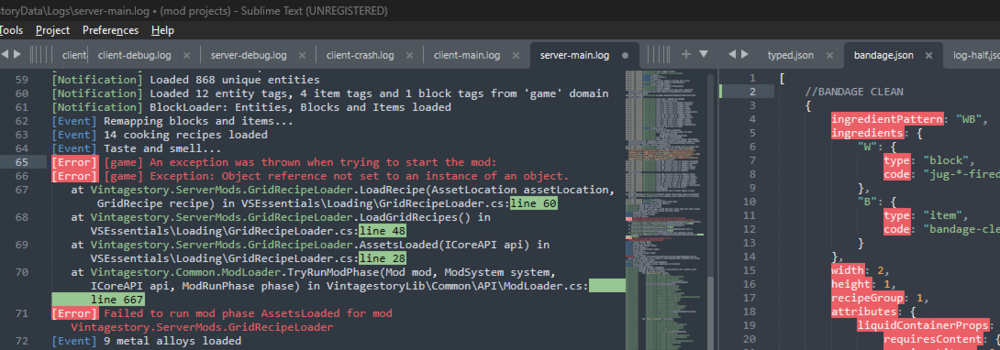
I specified above. Comments inside curly brackets are okay, comments outside curly brackets trigger this error.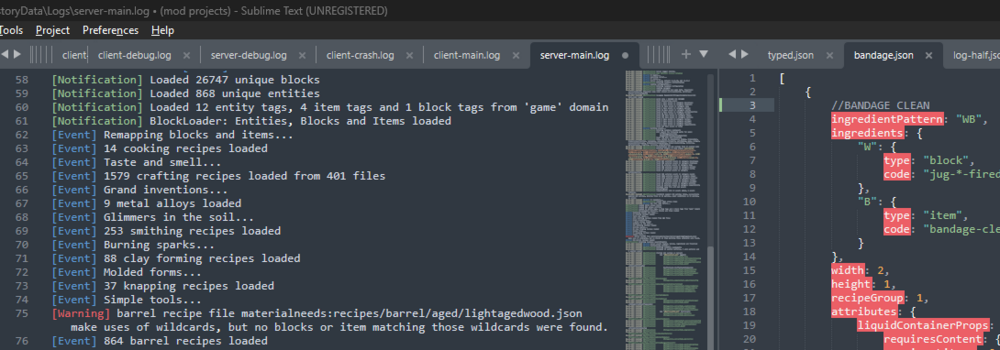
-
Posting Rules, Guidelines & Templates
Brady_The replied to Nat_VS's topic in Mod Development Questions/Troubleshooting
I think a nice addition to the Guidelines section would be the usage of spoiler tags for huge amounts of text, e. g. the contents of asset files. It would make browsing threads posting those much easier.- 1 reply
-
- 1
-

-
Recipe not working
Brady_The replied to Micah Holmes's topic in Mod Development Questions/Troubleshooting
Recipe files don't like comments outside of curly brackets. -
Grid Crafting Broke?
Brady_The replied to Micah Holmes's topic in Mod Development Questions/Troubleshooting
The only time I am running into crafting recipes is when I mess something up. -
I reported it a while ago. It sounds like it fell through the cracks. If you have a Github account you could leave your feedback here: https://github.com/anegostudios/VintageStory-Issues/issues/3639
-
Unable to remove tool heads from Molds.
Brady_The replied to alumpof's topic in Using Mods Troubleshooting
I couldn't find anything resembling your problem when (quickly) scanning https://mods.vintagestory.at/smithingplus, so it's probably worth mentioning there. -
That sounds like you are missing https://mods.vintagestory.at/configlib.
-
Unable to load Mod, Requires Dependency em v3.3.3.
Brady_The replied to alumpof's topic in Using Mods Troubleshooting
Usually dependencies are listed in the mod description. Admittedly it's bit hidden on the mod in question, but it's there.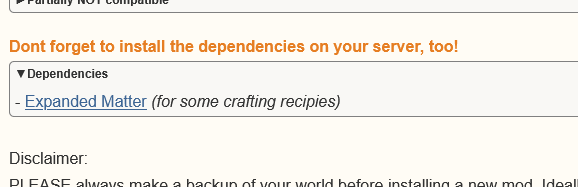
-
ZIP file naming scheme suggestion These suggestions are my own and do not have to be followed. However, I believe that following those rules greatly improve user and trouble-shooter friendliness. Consider naming your zip file in the following manner: "usernamemymodid-vmodversion_vgameversion" (e.g. bradysupremestickmod-v1.0.1_v1.21.6) Explanation: username Either your username or a short version of it. Mods are currently sorted alphabetically in the in-game mod list, so using your user name in front will guarantee that all of your mods are listed together, making it much easier for users to browse the mod list. If you are planning to release serialised mods, you can choose a unique identifier instead. Tentharchitect's mods are a good example. mymodid The ID you chose for your mod in modinfo.json. - modversion The current version of your mod. See https://semver.org/ for more details. A fairly common first version would be 1.0.0. _ gameversion The version of the game you tested your mod with. Ideally it would be the most up-to-date stable version of the game. In the above example is that version 1.21.6. This naming convention has two huge advantages. 1. The user knows exactly what version is installed. 2. Any trouble-shooters trying to detect the source of a problem can immediately dismiss your mod as a potential source, or focus on it. This is a particular good reason to follow this convention. Not much is more frustrating than going through a massive log and having to spend a massive amount of time with researching mod details. Changelog template Once again this is my own personal solution which you do not have to follow. I personally prefer to use the Source Code Editor, which you can access with the < > button in the Add new Mod/Edit and Add new Release/Edit Release view. This gives me a better control about the layout of the changelog. Copy the code below, open the Source Code Editor and paste the content. Edit the changelog so that it fits your mod release. Remove unused categories, expand the lists, etc. If you do not wish to handle any HTML at all you can simply use the example below for pointers. Edit releases If you want to edit the changelog or add a compatible game version to an already released mod you don't have to upload a new version. Navigate to your mod on the ModDB, switch to the Files tab and click on the release version number you want to edit. This will bring you to the Edit Release window. Adjust the details you want to change and press Save. Retract releases Releasing a critically broken mod through an oversight happens faster than you would like to think. Critical in this context means that the version of the mod you released to the public can cause the game to freeze or crash, or in the worst case, brick a save game. To retract a release you head to Edit Release window. Click on the release version number you want to retract. Next you click on the Retract Release window. Follow the instructions. Note: Be aware that by retracting a release any server that is running this particular version of your mod can potentially seize to function. Discord modder role If you would like to advertise your mod in the #spotlight channel or the mods forum, you can request the modder role from @Moderator with a link to your mod on the ModDB, which will allow you to do so. If your Discord user name differs from your ModDB user name further verification may be required of you. Server tweaks If you developed a mod or created a patch mod that changes settings from public mods for your server, you can Edit the Category your modification will appear on the ModDB. If you are unsure where you can do that, I refer you to step 6 in the previous comment for directions. Change the category to Server-specific Tweak. This category is separated from the other mods, allowing you to modify your server to your heart's content without flooding the front page of the ModDB. Test releases This option is a bit too advanced for the purpose of this HowTo, but the existence of this feature is still worth mentioning. Changelog: 10.12.2025 | ModDB - A new version compatibility selector has been rolled out, aiming to simplify the selection of multiple versions. Holding down Ctrl isn't necessary any more. 17.12.2025 | Thread - Added optional information to this comment. 23.12.2025 | Thread - Added note to changelog template. 24.12.2025 | Thread - Added information about test releases 09.10.2025 | Thread - Added information about new user tagging method to changelog template 17.05.2026 Thread - Added alternative style to changelog, all credits go to https://mods.vintagestory.at/show/user/0134CFE4D46FD8692C18 for utilising the game version tag in this manner
-
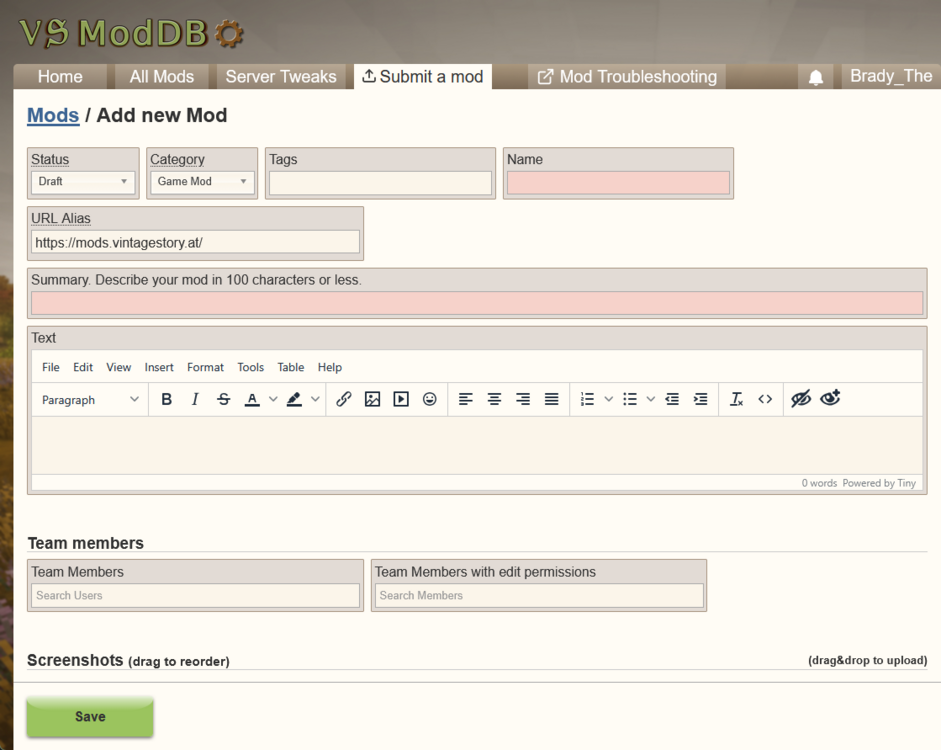
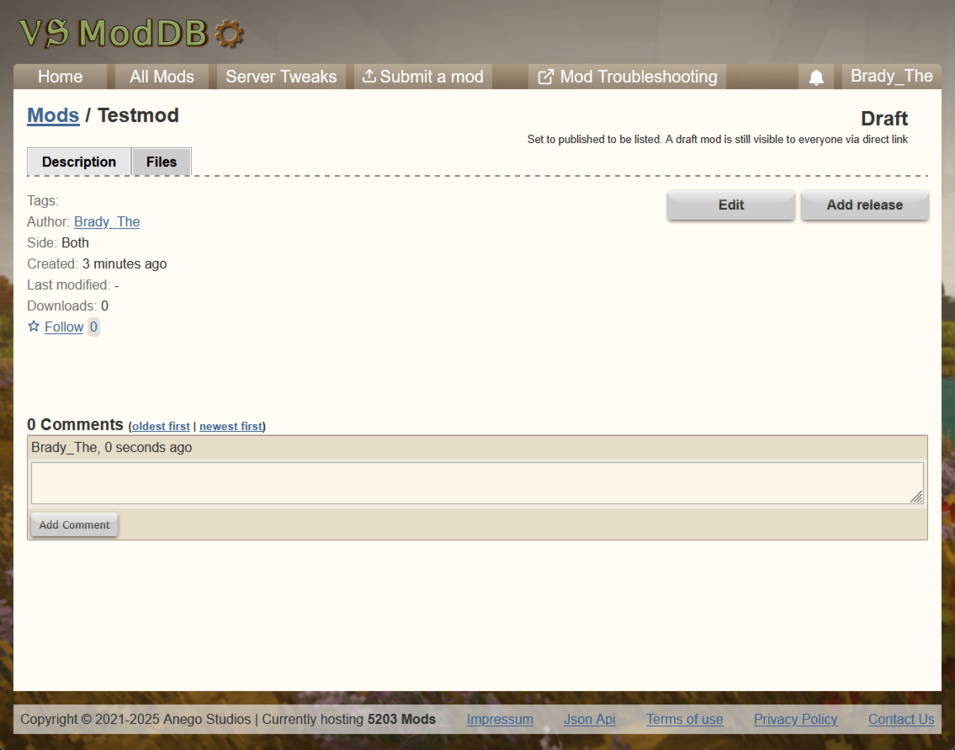
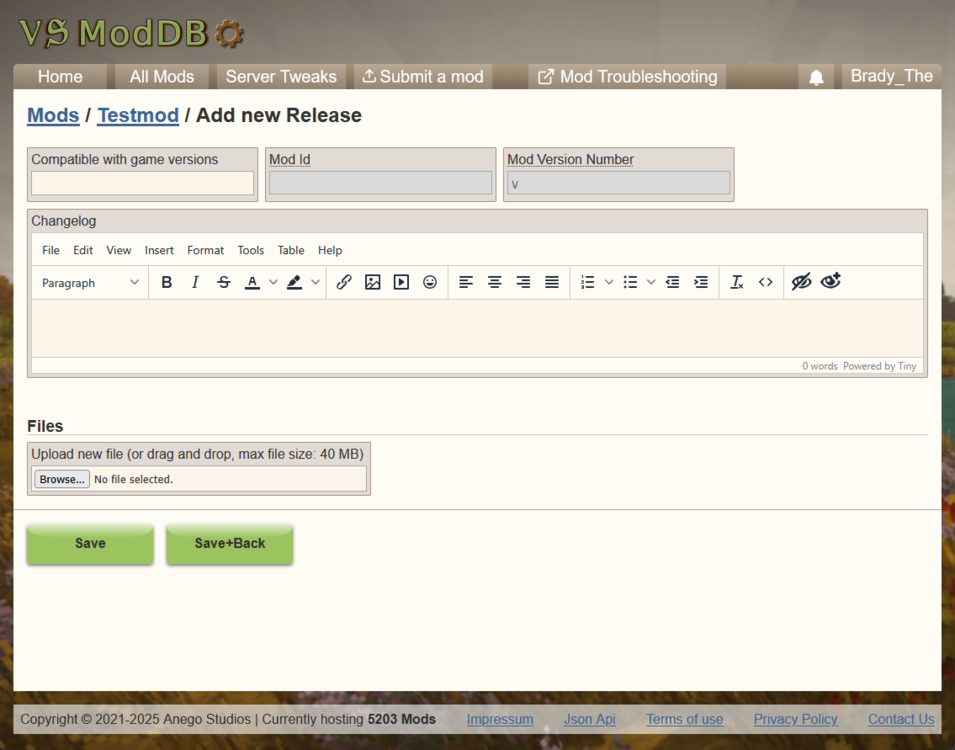
Your finished your first mod and now want to share it with the world. Fantastic! The most convenient way to do that, for you - as a mod author - and the end user, would be to use the ModDB service provided by Anego Studios. Uploading your first mod can be a bit tricky, though. That's where this step-by-step guide comes in. Head over to https://mods.vintagestory.at/ and login. The ModDB utilises your game account - no separate login credentials are needed. Click on Submit a mod or follow this link. You will be greeted with the following view (scroll down for more input fields). Fill out all the details you would like to add. Most of them don't matter in this first step. However, the Name and the Summary are required. Choose an informative name for your mod. I generally stick to the "name" value I picked for the modinfo file. Choose an informative summary that describes your mod and makes people want to click on your mod thumbnail. After you filled in all the information and maybe added some screenshots (remember, all of this can be done and changed at a later point), click on the Save button. This will save your mod and keep you in the Edit mode. Notice your mod name in the navigation ( Mods / [Your Mod name] / Edit ). Click on it. This will bring you to the mod view you probably already know from other mod pages you visited in the past, with the small addition of some administrative tools. The Edit button will bring you back to the previous view. This way you can later add or change information you didn't fill out in the previous steps. Click on the Add release button. This will bring you to the following view. First you want to upload your zipped mod file. To do this, follow the instructions in the Files section. After you have done that, add the game versions your mod is compatible with. Pro tip: If your mod is supporting multiple versions, hold down the Ctrl key when clicking on any game version to keep the menu open. Add an informative changelog so that potential users know what has been Added, Changed, or Removed to/from the mod. After you have filled out all the required information, click on the Save button (the information for "Mod Id" and "Mod Version Number" are going to be pulled from the modinfo.json). If you did everything correctly in the creation of the modinfo file, you are good to go. If you missed something, the ModDB should now tell you exactly what is wrong with the file. Correct these mistakes and try again! You are almost done. Now all you have to do is to change the mod status or visibility. To do that, click on your mod name in the navigation and on the Description tab. There you click on Edit. Fill out any information you might want to add or change. Next to an informative summary a thumbnail will guarantee to draw the eye of any potential user. To do that, upload a screenshot and set it in the Logo image found in the Additional Information section. Both options are optional and have different requirements. Once you are satisfied, change the Status from Draft to Published (it's the first drop-down menu) and hit the Save button. That's it. Now you are a published mod author. Congratulations!
-
Did you try this? https://cdn.imgchest.com/files/2a94cf031637.png
-
The ucontents item code might need the mod domain to properly function. That's the first thing I'd try. Also, looking at your original variantgroups, it's very easy to simplify them: variantgroups: [ { code: "color", states: [ "acacia", "aged", [...] ] } { code: "intensity", states: [ "1", "2", "3", "4" ] } ], Edit: Looking at the variantgroups a bit closer this might not be as easy, considering that the combinations are a bit random. Still, technically doable with "skipVariants" or https://wiki.vintagestory.at/Modding:Registry_Object_JSON_Parsing#Enumerating_variants (which is somwhat more complicated).
-
Most interesting would be a "mini-game" akin to the potion-brewing in Kingdom Come Deliverance, but I am not sure if that's something that will ever be implemented, nor if it even fits the kind of game VS is.
-
i need assistance to make mod
Brady_The replied to Kass-c's topic in [Legacy] Mods & Mod Development
Entities are a bit special. You need an "entities" file to create it, an an "itemtypes" file to make them accessible in-game. You could look at how Vanilla does it, but I personally would use a mod, because those files are usually a bit more accessible in terms of size and readability. https://mods.vintagestory.at/thylacinidae would be a good candidate, because it currently adds only one animal. If you want to have a look at the Vanilla files, you can find them in "assets\survival\itemtypes", they are called "creature*.json". -
i need assistance to make mod
Brady_The replied to Kass-c's topic in [Legacy] Mods & Mod Development
Don't use "survival". Use "game". That domain is encompassing all Vanilla folders.