


Spear and Fang
-
Posts
493 -
Joined
-
Last visited
-
Days Won
8
Content Type
Profiles
Forums
Blogs
News
Store
Everything posted by Spear and Fang
-

no animals were harmed Primitive Survival
Spear and Fang replied to Spear and Fang's topic in Mod Releases
See my spoiler above about the altar. I'm not sure what is going on with furrowing land. That is correct. Sneak right click on farmland with a hoe. Perhaps it is a conflict with a mod like xSkills? Your server-main.txt and/or client-main.txt log files might help answer that question.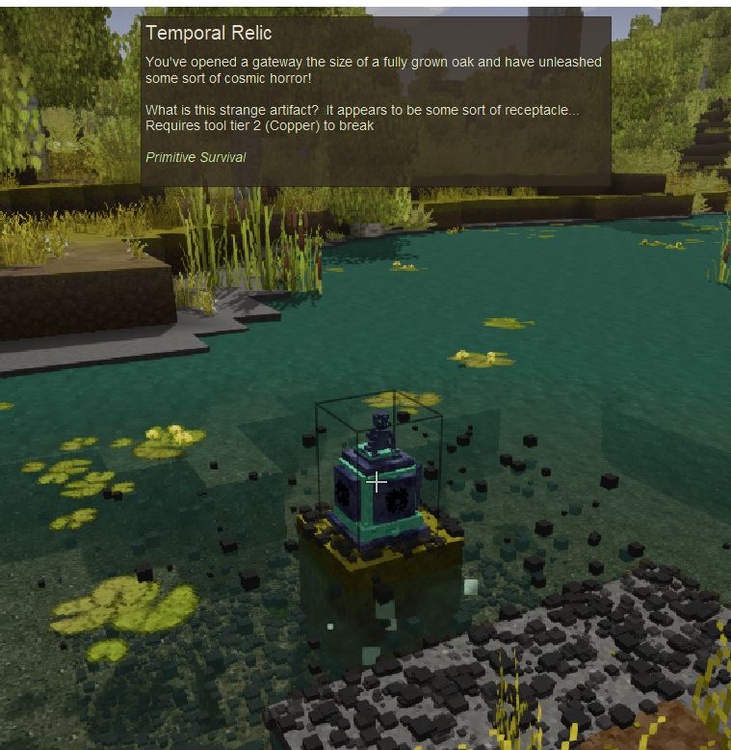
-
It's my understanding that mods are downloaded to servers manually by a server owner, and then those same mods are automatically deployed to clients via the modDB (based on what's on the server). So tags are informational only - they don't do anything.
-
This mod is obsolete and the modder is long gone. There is an unofficial version on the modDB.
-
no animals were harmed Primitive Survival
Spear and Fang replied to Spear and Fang's topic in Mod Releases
I'm sorry but I may not be much help here - I did not setup my workflow and I realize that it is different than that of many other mods. I am targeting .NET Standard 2.0 (as seen in the logs). The mod should work fine on Windows 10 with the updates - .NET Framework 4.8 If it is linux, mono needs to be fully updated. It is not much help, but the mod is hosted on about 180 other VS servers, so I don't know what else to tell you. -
[Solved] Can't override OnBlockExploded
Spear and Fang replied to Frepo's topic in [Legacy] Mods & Mod Development
A Harmony prefix patch (or similar) to override BlockOre's onBlockExploded is probably the cleanest imo. I'd say transpiler patch but they're a little harder to implement. https://harmony.pardeike.net/articles/patching-prefix.html -
Add handbook title and text?
Spear and Fang replied to Frepo's topic in [Legacy] Mods & Mod Development
Oh yeah, thanks for reminding me to remove those 1/2 dozen lingering entries I had from days gone by. AFAIK, the handbooktitle/handbooktext stuff simply wont work for mods right now UNLESS you put your mod's assets directly in the game domain (this can be achieved by putting a game folder inside your assets folder and putting your mod's assets in there). Which is similar but different to what Tels is doing here (he's patching vanilla files instead). https://gitlab.com/codesmiths/vs_bricklayers/-/blob/main/assets/bricklayers/lang/en.json With his clay assets in the game domain he then prefixes his language entries with game:. Another solution would involve a deep dive into the game's c# code, and probably a harmony patch, but I'm not terribly interested in doing that. "which is a VERY nice mod" THANKS! "fishing totally breaks food balance" On the surface that statement seems about right, but it's a little more complicated than that. I'm not really seeing any food balance to begin with so it's hard to break it. Sure, new players struggle to find food until they clue in to the fact that they simply have to make food a priority. These new players generally don't use mods. Seasoned players know that food is extremely easy to get unless they're playing a snowball world or some such. My dilemma was that fishing should be much easier than hunting, so I made it much easier. Then I made fishing 100% configurable via the modconfig file so that people could configure it however they like. As far as protein goes, you still need to hunt (for fat), and fishing doesn't really detract from that part of gameplay. -
no animals were harmed Primitive Survival
Spear and Fang replied to Spear and Fang's topic in Mod Releases
The hit box for harvesting tall boi (with a knife) is only near his feet. I couldn't make it bigger, but I should revisit that because it's a little annoying. -
no animals were harmed Primitive Survival
Spear and Fang replied to Spear and Fang's topic in Mod Releases
Oh good info thanks. I'll see if I can correct all of that. -
no animals were harmed Primitive Survival
Spear and Fang replied to Spear and Fang's topic in Mod Releases
I'm not sure of the exact conditions that Tyron's fireflies spawn under, so I looked at more real life conditions when creating the criteria. Sounds like you've met them all (and yes, any flowers will work) except perhaps the temperature. If it's not 30C or warmer between midnight and 3am, you will not catch any fireflies. You might have to find a warmer spot. -
no animals were harmed Primitive Survival
Spear and Fang replied to Spear and Fang's topic in Mod Releases
Yes. I will do that. -
no animals were harmed Primitive Survival
Spear and Fang replied to Spear and Fang's topic in Mod Releases
Thanks for the detailed report. I'll try and get it sorted out for the next release. -
To ACTUALLY answer your question - yes, if you can dream it up then it can most likely be added to VS, but the things you are describing are mostly beyond the scope of simple json files. Some C# would be required to pull that off, and if you were thinking about tackling that yourself then there's plenty of examples to look at both on the Anego Studio's GitHub page and over on the ModDB website. To address some of the other nonsense - I know for a fact that using worms for irrigation, hydration, and soil fertilization is a very real thing. It's also quite obvious that most every system in VS can benefit from more related content to make it even more immersive - farming is no exception. But If you're ok with the set-and-forget system that VS currently offers, then good on ya. if you actually have some interest in mucking around in the garden but C# sounds a bit daunting then I've got you somewhat covered - Primitive Survival does indeed have ollas, furrowed land, earthworms, worm grunting, worm castings, and more to come. Yup, all real life inspired stuff - not MC. Although I'd be the first to admit that I'm lazy sometimes and my stuff tends to be pretty OP by default (mostly so there's no confusion about whether it works or not).
-
no animals were harmed Primitive Survival
Spear and Fang replied to Spear and Fang's topic in Mod Releases
Weirs for relic pieces, but baskets for gears to enchant said pieces. Glad you're enjoying it. Happy New Years back atcha! -
no animals were harmed Primitive Survival
Spear and Fang replied to Spear and Fang's topic in Mod Releases
You raise some good points. I'll look at making it configurable via mod config. Yes. Yes it was. And a damn good idea. -
no animals were harmed Primitive Survival
Spear and Fang replied to Spear and Fang's topic in Mod Releases
Thanks! Yeah I can agree with the smoked meat thing. I was trying to make it substantially lower than cured meat, but it is still a ridiculously long time. I'm going to reduce that more for the next release. -
no animals were harmed Primitive Survival
Spear and Fang replied to Spear and Fang's topic in Mod Releases
No, the furrows are an independent watering system that replace (and are a mild improvement over) blocks of water. In a sense they would supplement vessels, because vessels only lose water if the neighboring soil requires water. -
no animals were harmed Primitive Survival
Spear and Fang replied to Spear and Fang's topic in Mod Releases
Ha thanks! I tried changing my image on the Primitive Survival mods forum (discord), but I guess I did it wrong and the only way to put one back was to host it somewhere. So I dumped it here and linked to it from there. -
no animals were harmed Primitive Survival
Spear and Fang replied to Spear and Fang's topic in Mod Releases

-
My pleasure. Happy modding! The biggest takeaway is the whole "domain" thing. In this case, there's only two of them boulders: the assets in your mod - more specifically, the boulders blocktype, and the one recipe game: everything else that your mod leverages but is not in your mod, including blocks/items, sounds, textures, and shapes So in your mod, every time we reference an asset that's not a "boulder", you need to prefix that asset with game:. You'll see I added quite a few of them. And in the case of the patches (which are simply modifying files directly in the game itself), we need to reference the boulder in your mod (with boulders:). The recipe is referencing assets from both places but lives in your mod, so it needs game: to point outside of your domain.
-
I think this is close to what you want. Refactored and tested in about 15 minutes so it might need more work. Notable changes 1. Removed your game assets and replaced them with patches (generated the patches using modmaker, so they're not necessarily perfect) 2. Added the "domain" to asset references where required (either game: or boulders:) 3. Fixed a bit of invalid json (I used an autoformatter to get this done quickly, which is why everything looks a little different) 4. Made some (perhaps irrelevant) changes to your modinfo.json To-Do The language file i.e. assets\boulders\lang\en.json boulders0.0.1.zip
-
no animals were harmed Primitive Survival
Spear and Fang replied to Spear and Fang's topic in Mod Releases
You will need to ensure that mono is fully updated. My workflow is built around NET Standard 2.0. This seems to work fine for most Windows and linux users. -
no animals were harmed Primitive Survival
Spear and Fang replied to Spear and Fang's topic in Mod Releases
Since the smoker? Just furrowed farmland...although some minor improvements here and there and some bug fixes. SNEAK click on farmland with a hoe to create a furrow for irrigation. If you start at a water source the furrow will fill with water automatically. If not, you can easily fill your furrows with a bucket. Moisture levels of nearby soil will be slightly better than a normal water source. The occasional blockage will prevent moisture level improvements, and many uncleared blockages will cause bigger problems. They can be easily removed by right clicking on them.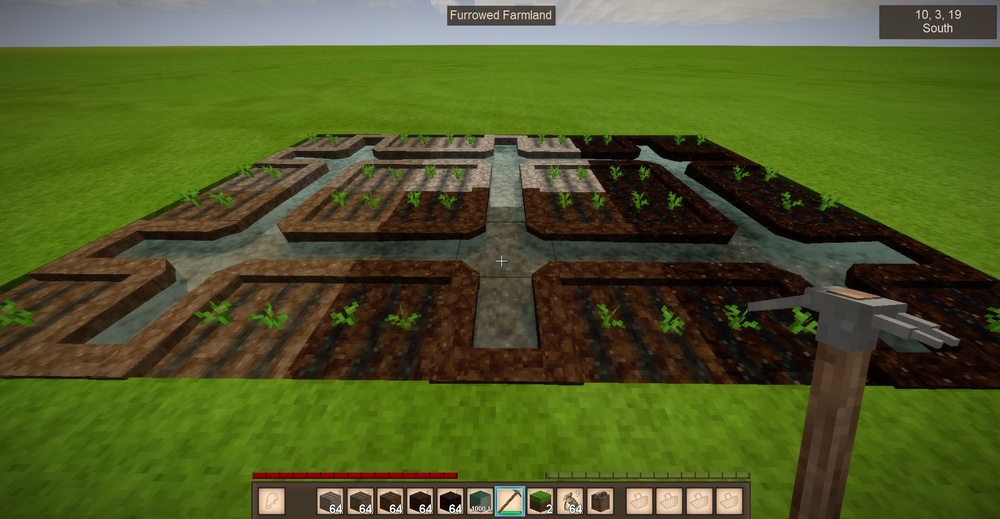
-
no animals were harmed Primitive Survival
Spear and Fang replied to Spear and Fang's topic in Mod Releases
There may have been some confusion. I meant that the smoker was hard to make in terms of the crazy amount of C# code I had to write, even more json code, and a lot of playtesting. Anyways, as far as trussing goes I do have an alternate to twine planned for the next release. As for the rest of what you said, I shall leave you with this (something I've said to many others): While your ideas are solid, I generally don't tackle random requests unless they give me an immediate OMG YES! vibe. I prefer to be a part of the entire creative process from idea to execution. Unleashing my creativity is the primary reason why I mod, so I'm going to have to let that one slide. Not saying that my ideas are better, just that they're mine. -
no animals were harmed Primitive Survival
Spear and Fang replied to Spear and Fang's topic in Mod Releases
That's a lot to unpack. So rather than hit every point I'm just gonna ramble on for a while. RE: Smoked crab meat. Ruddi threw the smoker + related models my way one day and I really needed a kick in the arse to do some modding so I decided to tackle his smoker. If he had included a trussed crab meat model I would have definitely added that. Truth is though, in all my playthroughs I've never had enough crab meat to fill up a smoker with it so I didn't bother. That and the smoker was a LOT of work to make. I was just happy to get through it all. Bushmeat meals were in two different mods and I try not to step on anyone's toes. It may seem like I'm trying to achieve world mod domination, but I'm actually much more interested in helping and supporting other modders while at the same time learning all the different aspects of modding myself. I'm not about to step on l33tmaan's project - modding cooking recipes is something I dislike doing myself, and we've been supporting each other for a long time now. I appreciates you l33t!. Aside: I'm amused that you mentioned berries and fruit in bread, because I did some coding for Expanded Foods - mostly bottle/bottle rack related - but getting that berry bread to render properly in the oven was a part of that coding. Yes I touched l33tmaan's berry bread. I haven't done any weapons yet, so that's something that will come eventually. Every day's a school day so I need to learn that too. It's funny that you mention horseshoes, because when I made the tree hollows I actually made them hollow and gave them some extra collision boxes, with the intention that players could use them tree hollows much like a game of horseshoes. Throwing rocks or shooting arrows into them. Ethereal gears do indeed have a purpose now. Use four of them in conjunction with the Nephren-Ka statue for certain death...or big rewards. Probably both. A large THANKS for the kind words! -
Wait what? l33tmaan?






