Brady_The
-
Posts
750 -
Joined
-
Last visited
-
Days Won
7
Content Type
Profiles
Forums
Blogs
News
Store
Everything posted by Brady_The
-
some sort of book you can write in?
Brady_The replied to Groblockia's topic in [Legacy] Mods & Mod Development
On the mod side I know of https://mods.vintagestory.at/pomnotes. I haven't used it yet, though, so I don't know how well it runs. The book writing is certainly a little more immersive. -
Incorrect texture in small trough
Brady_The replied to caffeine's topic in [Legacy] Mods & Mod Development
They all look the same because you specified the exact same texture for all fruit mashes (block/wood/trough/large/fruitmash). You might also have to specify the "textureCode" for each filling. I haven't messed around with the trough, so this is theoretical, but a "catch-all" wildcard-character could have unintended consequences. -
Duplicated falx blade dont get texture
Brady_The replied to Mastess's topic in [Legacy] Mods & Mod Development
Some of those changes must have broken something. I just replaced your shapes with the vanilla shapes, and added the prefix "game:" to the texture paths in the shape files. Just looking at the screenshot, I noticed something, that can be changed. If you look at the picture, you can see that the highlighted item is called "sharpfalx-sharpfalx-copper". This is in no way bad or will prevent the mod from working correctly, but mentioning sharpfalx twice is unnecessary. Item codes are created by combining "code" (usually found all the way at the top, in your case "sharpfalx") and every variantgroup. In your case this would be {code}-{type}-{metal}, resolving in sharpfalx-sharpfalx-copper/tinbronze/etc". If you don't plan on adding more sharpfalx types to the mod, you can get rid of the variantgroup "type", which essentially removes the second mentioning of sharpfalx from the names. Btw, if look at the screenshot you can see that my preview shows some more information. Those can be really helpful debugging things. To activate those, go to the settings, then Interface. There you activate the option "Developer Mode". This will open a new tab called "Dev". Open the tab, and activate "Error Reporter" and "Extended Debug Info". The former will show more information in the log files, and the latter will show more information on the debug screen (Ctrl+F3) and in the preview cards. test-shapesfixed.zip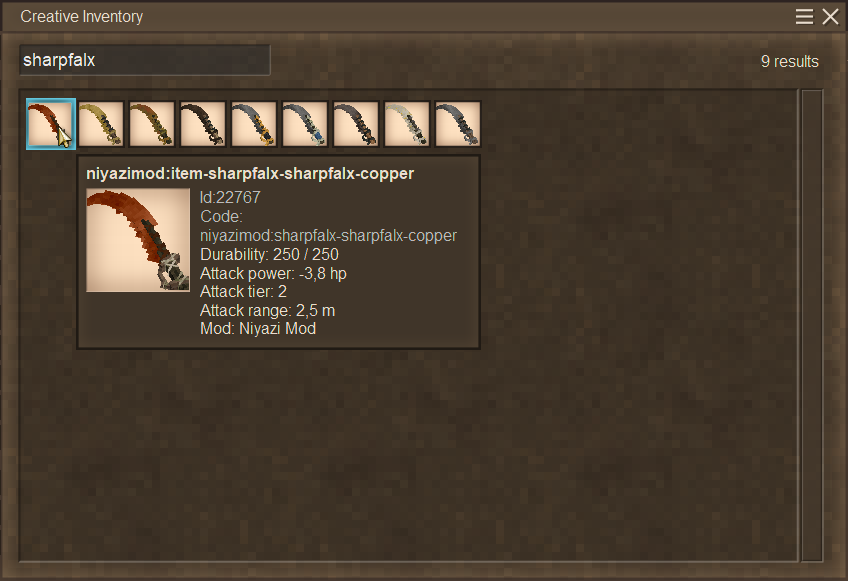
-
Duplicated falx blade dont get texture
Brady_The replied to Mastess's topic in [Legacy] Mods & Mod Development
Hello there and welcome. You have to zip your file. It appears that you simply changed the file extension from .rar to .zip, which doesn't work because those two are different formats. There are essentially two way to texture a shape. Via the itemtype. Via the shape I'd simply copy how the game is handling falx blades and add back the texture definitions to the shape. That would look like this: "textures": { "handle": "item/tool/material/...", "handguard": "item/tool/material/...", "bismuthbronze": "item/tool/material/blackbronze" }, That means you have to go through all your shapes, find out the texture references, write them down in the textures field and add the paths back. Or you could make your life a lot easier, by replacing your sharpfalx shapes with the default game falx shapes (Currently I don't see any differences), and simply add "game:" in front of the paths. That will instruct the game to use the game's textures. "textures": { "handle": "game:block/wood/debarked/veryaged", "bismuthbronze": "game:block/metal/ingot/bismuthbronze", "string": "game:item/tool/material/string", "handguard": "game:block/metal/sheet/bismuthbronze5" } -
Restart the game to release the save file, which seems to be still open in the background, then press the pencil button on your save and hit the "Run in repair mode" button.
-
This appears to be a Linux problem. https://github.com/anegostudios/VintageStory-Issues/issues/5255
-
Settings for the world worth for shipbuilding
Brady_The replied to Ilya Abramov's topic in Questions
Hey there. Currently rivers don't exist in Vanilla Vintage Story. For that you would need a mod, which requires certain world generation settings, because it relies on oceans to spawn rivers. So, even if you decided against using this mod, starting with the recommend mod world gen settings (300-400% landcover/ocean scale, 40-50% landcover) would be probably a good start to see how you like the created worlds, their ocean sizes, etc. If you want to make rivers easily traversable with boats, rafts and the like, you probably want to change the river speed after world generation. I haven't used rivers before, but I've read that setting the "riverSpeed" to a value between 0.5 and 1.5 (%AppData%\VintagestoryData\ModConfig) should make rivers much more enjoyable. -
Have you, by any chance, settled in a temporally unstable region? These can occur overground and are permanent.
-
Without some more information, this can only be a guessing game from our side. From what information you have given us, it could be this problem: If it is not, we could use some more input. A screenshot of the file could help.
-
Any way to close off the room if an axle is entering it?
Brady_The replied to Broccoli Clock's topic in Discussion
That's exactly what's happening. I'd highly recommend using this mod: https://mods.vintagestory.at/axleinblocks. It's one of those which really should be in the base game. -
I have to say it: I would have so much preferred dinosaurs.
Brady_The replied to gomodo's topic in Suggestions
If you don't mind using mods, you are in luck. The age of the dinosaur is about to begin. We (the community) already have two released mods (https://mods.vintagestory.at/show/user/5a00335ba25788911434) and a couple more in development. Of course there is also always the option to take this as an opportunity to get into modding yourself, adding your favourite dinosaurs into the game, for you and others to enjoy. While theoretically, technically, practically and all sorts of other -allies, Tentharchitect's entities are no dinosaurs, you might still fancy one or two of his mods: https://mods.vintagestory.at/show/user/2abe1c9265b6b2cfefae I currently don't remember any "No bowtorn/drifter/shiver" mods, but I am sure they exist as well. -
texture My mod dot not load textures on crops
Brady_The replied to BrazilPirate's topic in [Legacy] Mods & Mod Development
It's a bit odd that no error messages are printed, but apparently it doesn't like your shape definition. (Thinking about it, I don't think I have ever seen a variantgroup reference in the type key. That's on me, my bad.) You have two options: shapeByType: { "*-2": { base: "block/plant/crop/potato/stage2" }, "*-3": { base: "block/plant/crop/potato/stage3" }, "*-4": { base: "block/plant/crop/potato/stage4" }, "*-5": { base: "block/plant/crop/potato/stage5" }, "*-6": { base: "block/plant/crop/potato/stage6" }, "*-7": { base: "block/plant/crop/potato/stage7" }, "*": { base: "block/plant/crop/potato/stage1" } } or shape: { base: "block/plant/crop/potato/stage{stage}" } There's also the small problem that you are linking to the shape as followed: "block/plant/crop/potato/", but the "crop" folder is missing in your mod structure. The shapes 2 to 7 also need some updates, mainly because you are defining only textures "e" and "w" in your blocktype, but shapes 2 to 7 also use texture "s" and "bulb". -
texture My mod dot not load textures on crops
Brady_The replied to BrazilPirate's topic in [Legacy] Mods & Mod Development
Would you mind attaching a copy of your mod to your comment? Currently I can't see the problem, running the mod myself might change that. -
How do I change the username I have in game?
Brady_The replied to Broccoli Clock's topic in Questions
You should be able to change your player name here: https://account.vintagestory.at/profile -
texture My mod dot not load textures on crops
Brady_The replied to BrazilPirate's topic in [Legacy] Mods & Mod Development
On the first look crop.json looks fine. That depends, though, on where your files are located. Are you directly working in the game directory or your own mod directory? If it is the latter, you have to adjust the texture definitions to point towards the game folder. textures: { "e": { base: "game:block/plant/crop/potato/e{stage}" }, "w": { base: "game:block/plant/crop/potato/w{stage}" }, } (Unless of course you copied the textures into your mod folders, but that wouldn't be necessary, as can be seen above.) You should have errors in the logs (particularly client-main) pointing you towards the solution. This looks more like a shape than a texture error. Also, the UV mapping of all your n and s faces seems to be messed up in your stage1.json file.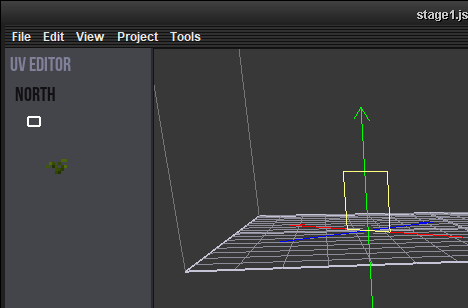
-
Game doesn't have music and things are missing
Brady_The replied to aWolfSurviving's topic in Questions
There's definitely something very messed up with your installation. You got over 2000 errors related to sound files. Plus 946 errors from the koboldplayermodelport mod, which most likely explains your trouble with the loading screen flavour text. I would recommend a complete re-install of the game (including the deletion of the installation directory, which by default should be "%AppData%\Vintagestory". DO NOT delete "%AppData%\VintagestoryData"; this directory contains all your settings, saves, mods, etc.). I also would recommend not using koboldplayermodelport until it has been updated to game version 1.20.4. If you really need that mod, you could also install game version 1.20.1 instead. According to the mod page, this version should be compatible. I am not an MP-guy, so this might restrict you from playing on certain servers, I don't know how the inter-compatibility between game version 1.20.1 and game server version 1.20.4 looks like. -
how do i make custom textures
Brady_The replied to deathwolf54's topic in [Legacy] Mods & Mod Development
I suggest you use default game textures. Most of them can be found in "\survival\textures\block". In there you look for folders that are named after things that could work for your model. You made a shirt, look in the "cloth" folder. You made suspenders, look in the "leather" folder, and so on. -
how do i make custom textures
Brady_The replied to deathwolf54's topic in [Legacy] Mods & Mod Development
That's not how it currently works. Do you want to retexture a base model, or did you create your own model which you now want to texture? -
Game doesn't have music and things are missing
Brady_The replied to aWolfSurviving's topic in Questions
If in doubt, re-install. I remember helping somebody with a similar problem. It turned out to be an outdated mod, spamming the log files with error messages, completely overwhelming the game to a point, where it stopped printing the default messages. Upload server-main and client-main from "%AppData%\VintagestoryData\Logs". -
All trader lists can be found in "\assets\survival\config\tradelists". If you need any help concerning item codes and such, you'll probably find something in the general trader files.
-
how do i make custom textures
Brady_The replied to deathwolf54's topic in [Legacy] Mods & Mod Development
There's no shortage of ways. You could do it with the default MS Paint. Even though I wouldn't necessarily recommend it. GIMP comes to mind, it's free. Then there's Pixelorama, if you prefer pixel art, it's free too. -
Help with compatibility patching
Brady_The replied to Lucas Alexander's topic in [Legacy] Mods & Mod Development
I can see that. Sometimes reality gets in the way of ambition, though. Haha Cheers! We are all together in this modding endeavour and the learning processes. -
how do i texture a model in the VS modeling software
Brady_The replied to deathwolf54's topic in Questions
Entities is a whole 'nother can of worms I am not even go to attempt to open. In Vintage Story textures can be applied in two ways. 1) Via the shape file. 2) Via a blocktype/itemtype/entity file. For the player character, the shape might be textured to make working on it in the VSMC easier, but the final texturing is done via option 2. Look at "\assets\game\entities\humanoid\player.json" for reference. Alternatively you could have a look at how other mod authors decided to tackle entitites: https://mods.vintagestory.at/list/mod?sortby=lastreleased&sortdir=desc&text=player+model -
Hello Mysterial, welcome to the game and the forum. I'd personally recommend to play the standard mode, if you really want to have an introduction into Vintage Story. The game offers a lot of customisation options. You get to those by clicking on the "Customize" button in the "Create New World" screen. I recommend having a look at the "Player spawn and death" tab, any option starting with "Creature" in "Survival challenges", and the "Temporal Stability" tab. The vast majority of options can be retroactively activated on an already started world with commands. This might be a bit intimidating, so starting a new world could be the easier solution. However, if you don't want to lose your current world, you could have a look at the customisation options, select the ones you are interested in changing, their values and post them here. I'd be more than happy to look up the respective commands for you.
-
how do i texture a model in the VS modeling software
Brady_The replied to deathwolf54's topic in Questions
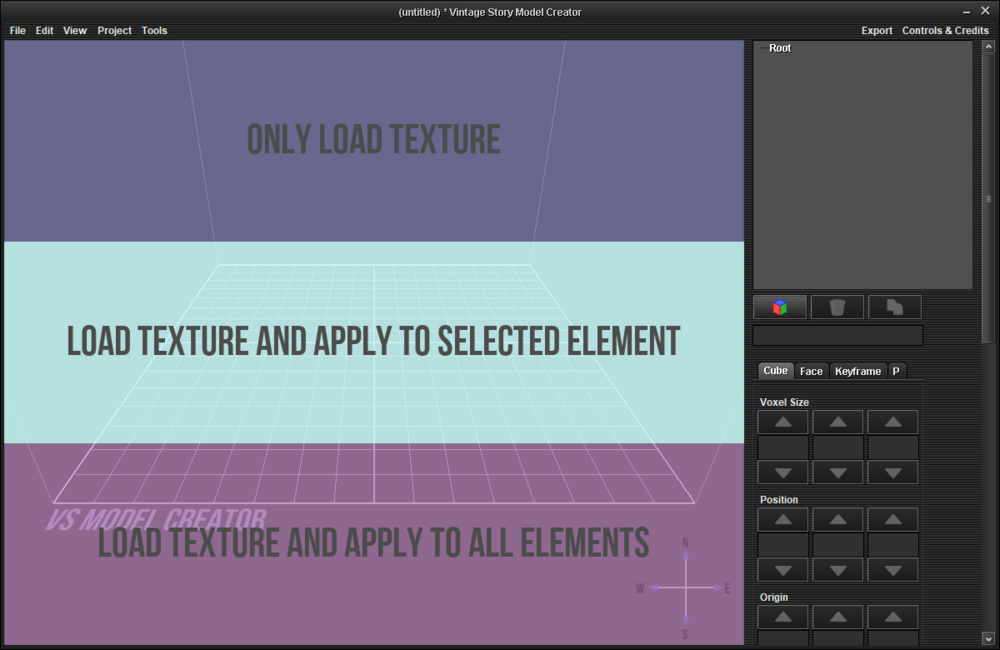
The short solution first: Drag and drop any texture of your liking into the VSMC window. Here you have three options: 1) Only add the texture to the shape file, but don't apply it to any element. 2) Add the texture to the shape file and apply it to the element you have selected in the Element Tree Plane. 3) Add the texture to the shape file and apply it to all current and future elements in the shape file. The longer solution after: It's definitely possible. Depending on what you want to achieve, this requires a bit of leg work beforehand, though. And some modding knowledge. To really understand what you are doing, I'd highly recommend going through the modding tutorials: https://wiki.vintagestory.at/Modding:Modding_Basics_Portal If you want a lasting change, it's best to save your work in a mod. I've attached a template. It's pretty basic and not feature complete by any means. See https://wiki.vintagestory.at/Modding:Mod_Packaging for more details. Unpack the file into "%AppData%\VintagestoryData\Mods". The newly created folder "template_mod" is now your working space. Your created shapes go into the shape folder. Your created textures go into the texture folder. Your blocktypes (or itemtypes) go into their respective folders (either blocktypes or itemtypes). These files are required to make your shape available in the game. If you don't know how to to this, definitely go through the tutorials. They are very well written and should answer all your questions. template_mod.zip