Professor Dragon
-
Posts
709 -
Joined
-
Last visited
-
Days Won
3
Content Type
Profiles
Forums
Blogs
News
Store
Everything posted by Professor Dragon
-

soil randomly collapsing on mountains and cliffs
Professor Dragon replied to Fin_Soup's topic in Questions
This is a great suggestion. I might try it for my next "big world." My first main world had soil instability on, but the downside is that after 20 years in one location, ALL of the hills were denuded to some extent, or weird pillars with a few trees on top. I turned it off for my second world, but it feels lacklustre not having soil collapse when it "should." So I'm tempted by the third way, which is to mod the behaviour so that blocks still fall, but you're no longer randomly losing mountains to a rabbit. -
My current game is with 20 day months, and I went through winter massively (MASSIVELY) overstocked with food. 30 day months should be quite doable. I had some advantages. Spawned in an area with abundant berry and mushroom resources Near an Agriculture Trader (not really needed, but they sell seeds and food) Exploring turned up a lot of seeds everywhere - this really is the key Prior knowledge that let me build farms and storage effeciently Found a Trader who sold glass, which allowed for an early 14 x 14 greenhouse
-
In addition to what other people have said - cheat. It's okay. I've done the journey to the story events on worlds with larger scaling for the story structures aaaaaand . . . . never again. Apart from overcoming the challenge and getting that sense of achievement (tick - done that), the week plus long trip didn't really add a lot to my life. Sure, I discovered some nice structures along the way. However, they are all so far away you're unlikely to come back to them anyway. The main thing that the long trip did was blow out my game save file by a huuuuuge amount. You have three options. 1) Decrease distance for the story missions, as per @LadyWYT's suggestion. Trap: If you make it too small, you will be forever seeing a later story mission on the skyline. 2) Spawn the story location at a place of your choosing. Easy to do, and means you have your main base set up near it. 3) Get the co-ordinates and teleport there. Professor Dragon.
-
Maybe make your own? Just download some of the official images and adjust to your heart's content. Local stationary/print shops let you do a print of even a single page of sticky labels at a cheap price.
-
You guys wait until the later story events! In any case, I totally overgeared on the Eidolon and went in with full Forlorn Hope armour, steel shield and steel arrows - and it was fine. Staying in the corner, jumping to avoid attacks (most of the time) and pelting with arrows worked for me, with additional thwacking of locusts behind the pillar. However, this approach really does cut it out from being an "early" (mid?) game experience, which is when all of this should really take place to be most useful. I'm curious as to the lowest levels of gear that seasoned Vintarians do it at. I'm sure it is possible to do it in linen gambeson - I just haven't tried it.
-
I don't know if this has been mentioned before on the forum . . . I've been a bit "AFK" since the Christmas period. But . . . the YouTube channel for Vintage Story has this - stackable and rotable items on display shelves. This has been something that I've dearly wanted for a long time. There are mods . . . but I like the vanilla experience a lot (except where I don't, looking at you HUD display and Light Level friends). Anyway - check this out! ! ! (And VS staff . . . why isn't stuff like this posted in our "News" section or elsewhere on this forum? Or have I just missed it. I feel like this being the "official" forum should get the news first, but it seems to get left out.) Professor Dragon.
-
Soooo . . . initial thoughts. It is a very different game. Think "Minecraft with creature mods and shader pack out of the box." It is bright and colourful, and feels so, so, so, so very "easy" compared to Vintage Story. Prime example - a brown bear in Hytale is your early training mob in the starter area. In Vintage Story it is still a challenge for experienced players. Within 15 - 30 minutes, we had a fairly detailed starter house up, with faux chiselled blocks (you just pick from a palette of blocks) and two tone roof. Plus a bunch of useful workstations. Within a few hours, had seen several different biomes, faced many and varied mobs, and returned home in time for dinner. After Vintage Story - or even regular Minecraft - the compression of timescales is really noticable. It is also very obviously still a Beta game experience. The main drawcards, such as instanced dungeons, have yet to be implemented. Things that we take for granted, such as the Handbook or block information are nowhere to be found - which is a bit of an issue, considering the vast number of blocks and beasts around. Or water - it is a pick up and put down one "block" of water. There is no flowing water when you remove a bucket - just a hole in the water left behind. A lot of quality of life issues that V.S. licked a while back. But what it does - a bright, colourful, dip in experience - it does well. I could go on, but long story short. It is a very different game, with a very different (younger) target audience. Maybe in a few years, some of that audience will move on to Vintage Story. Professor Dragon.
-
I've just installed Hytale today (because of family member pleading . . . ), so I'll see what it is like. Just from the Blogs alone though, it is still in early development. They're using a branch of the game from four years ago, tidied up. And they are launching with their Version 1 of terrain generation, rather than the Version 2 that they need to add all their dungeon features. So . . . early days. It is however amazing how they have launched to such a big player base - can't deny that achievement. Big drawcards? Skins. New things to do. And I'm guessing bright, colourful and "shiny."
-
Neat! Nice to know!
-
Hello @PatLea Welcome to the forums. I hope that nothing too much gets lost in translation here. There are no world maps for obvious reasons once you play through some of the lore. We are not dealing exactly with the current Earth as we know it. There has been a lot of upheaval - both political and geographic. Besides, this is essential a "sandbox" game where the whole point is to make a brand new world with different settings. Some users have recreated parts of the world. One heroic user is building the whole of Japan in Vintage Story. That is very much a passion project though. You can find various ciders, wines, ales and other alcoholic beverages in the base game. And while I don't think that Cullinary Artillary handles "beer" from hops exactly, it does massively expand the other food categories, which may at least give you something different to eat while you think about brewing: https://mods.vintagestory.at/aculinaryartillery Creating mods is a tricky and lengthy process. Although it should be easy enough to rename one of the existing assets to "Beer" in a .json file if that is all you are after. I recommend that you start with viewing existing mods and searching through the food and drink sections: https://mods.vintagestory.at/ Professor Dragon.
-
The boat speed multiplier is in boat.json. From the mod: https://mods.vintagestory.at/boatspeed This comment by a user "morgolgo": ________ QUOTE FYI to anyone trying to find a way to change boat and raft speed in singleplayer without using a mod: I edited "boat.json" found within C:\Users\[YOURUSERNAME]\AppData\Roaming\Vintagestory\assets\survival\entities\water and changed speedMultiplierByType: { "boat-raft-*": 1.0, "boat-sailed-*": 1.2 TO: speedMultiplierByType: { "boat-raft-*": 1.3, "boat-sailed-*": 1.6 This gave me a noticeable speed boost without seeming to change turn speed or feeling completely ridiculous or OP. I have not unlocked the elk and cannot confirm if it works with these changes. Do so at your own risk. I also use the Rivers mod and changed river speed to either 2.0 or 1.5 which lets me go upriver using both a raft and a boat. It is slow but I felt it was balanced enough for a improvised solution such as this. I host a private ad hoc server for a handful of other players and it worked in this case. This was on version 1.20.4 ________ END QUOTE You're right, it is not an absolute speed as asked by the OP, but it is the closest we have when added into your code section. One thing that I've noticed is that two things really slow me down: Looking to the side (I REALLY wish this was not the case. You don't slow down in a real boat or raft if you look to the side.) Tight or frequent turns. Professor Dragon.
-
is there a way to prevent gates to spawn near my Base?
Professor Dragon replied to Pepperorange's topic in Questions
There is - the Rift Ward. It is very end game tech due to the low chance of the right parts dropping, but you can get it from the Creative menu easily enough (hint, hint). https://wiki.vintagestory.at/Rift_ward EDIT Apart from the mod suggested by @Dilan Rona and the above Rift Ward, don't forget to check the basics. I see that you're using the Simple HUD display - that has an option to display "Room" status. Make sure that what you think is a room, is in fact a "Room." Also I can recommend a light checking mod, to make sure that there are no spawnable areas in your house, such as: https://mods.vintagestory.at/easylightlevel But if you want to whang all surface drifters on the noggin, rather than just around your base, then turn off surface rifts: /worldconfig temporalRifts [off|invisible|visible] Defines temporal rift behavior (default: visible) Off: No rifts spawn, which also means no drifters can spawn on the surface. Invisible: Rifts are not visible to the player, make no sound and do not affect players in any way, but do spawn drifters. Visible: Rifts are visible to the player, make sound, drain stability on nearby players and spawn drifters. -
I was in the process of writing up a guide for this, as I just went through moving a mega base between two worlds. I'm not going to get that done soon though (on holiday), so here is the overview. OVERVIEW FOR A SMALL BUILD COPY Preparation Prepare the source world. (Get as you want to copy it. Put items into chests etc). Backup the source world. Create target world. Back this up also. Use the World Edit commands to copy over the build from one location to another: Switch to creative mode with "/gamemode Creative" Take the "Magic Wand" from the Creative Inventory (e) and place in the active Hotbar slot. Open World Edit. Default key is tilda "~". Choose the Select Tool (dotted rectangle) from the left pane. With the Magic Wand tool active, left click to mark a start postion and right click for the end. Mark this. Use the command "/we export <filename>" where filename is written without a file type. The type ".json" is added automatically. eg /we export My_House will create a file called My_House.json. Start up the target world and go into Creative mode. Start World Edit, select the Magic Wand, Choose the Import tool then select the file name from the drop down box that is top left. Right click where you want to place it WITH a block in hand. REFERENCES This video is a great place to start: How to Copy & Paste Builds Between Worlds - Vintage Story by @ArtGnat Professor Dragon.
-
Question about the spawn locations during temporal storms...
Professor Dragon replied to Broccoli Clock's topic in Questions
I had a Corrupt Bowtorn spawn in a space which was two blocks tall plus the one voxel removed to keep my armour stand centered. I was sleeping in that bed just to the left at the time, so within four blocks (or less). -
Question about the spawn locations during temporal storms...
Professor Dragon replied to Broccoli Clock's topic in Questions
THANK YOU! ! ! I've been looking for the Temporal Spawn code for ages, and never quite found it. (Now I've realised I don't have the knowledge to read it, so I'm glad you can.) Professor Dragon. -
Hello @Cass Cash Welcome to the forums. Not to try and rain on the parade - but I don't see what this adds or solves. What would be the benefit that this would introduce? A player in one part of the world doesn't impact a player in another part of the world. Even if I were to get up and tend to the chickens at dawn in my part of the world, it doesn't impact whatever someone else is doing in a different part. There are no telephones (unless modded), so you can't even call up a friend and say "I'll meet you at sunrise - my time". There is no long distance transit, such as trains where timezones first became important, which require accurate server wide timekeeping. Plus, as far we know, the world is flat. For the most part, timezones in the real world cause more problems than anything. So again, welcome. I'm not sure what this adds though.
-
Rather than try and remember the commands to give specific items, I find it easier to switch into Creative mode and pick from the GUI. Be in a safe space Clear out some free slots in your Hotbar /gamemode creative Open Inventory - you will now have access to every block in the game. Pick out your bear armour and drop it into your hotbar slots /gamemode survival There are shorter commands, yes. But you will remember those for as long as you play.
-
v1.21.6-rc.1 Story Chapter 2 Redux, Maintenance patch #2
Professor Dragon replied to Tyron's topic in News
> Everything included in the rc.1 update Lovely. Some highlightsfor me as I've hit all of these: Fixed: On some occasions, traders walked away from player mid-conversation or stood still after conversations Tweak: Elks and other mountables can no longer use a translocator or teleporters, unless being currently ridden - a player riding an elk, who uses a translocator, teleports both player and elk Fixed: Launching a Sailboat spawned it on land instead of in water Fixed: Placing straw dummies always positioned them on the very edge of blocks I admit I got excited when I saw that last one, as I thought the armor stand placement glitch had been fixed, but I'm a dummy for confusing my dummies. Waiting on a patch as per this Issue Tracker for the armour stands (still an issue on current version): https://github.com/anegostudios/VintageStory-Issues/issues/6698 Anyway, love your work. Professor Dragon. -
v1.21.6 Story Chapter 2 Redux, Maintenance patch #2
Professor Dragon replied to Tyron's topic in News
TIP I have changed my "Saves" data location off from the default, so that Vintage Story is on its own drive with enough space. This is done with a Shortcut which uses the "-dataPath" command. D:\Vintage_Story\Vintage_Story\Vintagestory.exe --dataPath D:\Vintage_Story_Data When v1.21.6 came out, I chose the automatic update option available from the top left of the screen. This applied the update, and asked for my login details again. At this point though, the game does NOT know about the Shortcut used for the datapath. So it throws a message like this when you go to look at your Single Player worlds: MESSAGE "Your Worlds No Worlds found" Clicking on the "Open Saves Folder" will show the default Saves location: C:\Users\<User name>\AppData\Roaming\VintagestoryData\Saves SOLUTION No need to change anything. Just "Quit" at this point and launch the game again using your default shortcut. (I have a feeling that there is a better way of handling this path information.) Thanks for the updates. I haven't tried it yet, but I'm looking forward to taking an Elk through a Translocator and launching my next boat soon. Professor Dragon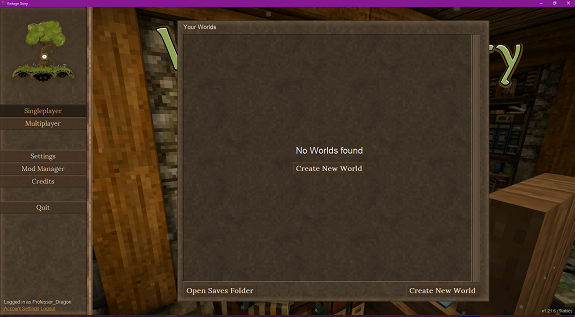
-
Why, thank you. Yes, at the moment, mods would seem to be the way to go. I remember - but haven't used - one that lets you craft a cellar door out of kiln bricks. So hopefully some modder somewhere as done one for a greenhouse heat vent flap that is still working in the current game version. (And if not, guess what I'd like for Christmas? <Hint, hint to modders>) Should be base game though, I agree. And I've been closing doors forever "to keep heat in", even though it turns out that is not necessary. I still close them though. I guess my wish list boils down to: Trapdoors (or a similar block) turning Greenhouses into rooms and back Forge rooms with Windmill Shafts being able to be sealed (I think that one is coming) Proper Cellar Doors in the base game, rather than placing solid blocks as a proper door like a maniac Or in short, better "Room" dynamics Professor Dragon P.S. And "Yes", probably.
-
Linking my Suggestion from 2022 It didn't exactly set the Community on fire, but you could change the upvotes from six to seven if you wish. There is one possible alternative. If you set the World Configuration "openDoorsNotSolid" then opening a door or trapdoor makes a Cellar not a room. I have not tested the impact that this has (I'm out of time today) on a Greenhouse. But if it is valid, then we could use trapdoors to act in this manner. https://wiki.vintagestory.at/Room#Cooling_Score Of course, this means that you have to remember to close your doors on your main cellar and rooms, and also that you can't use the door room divider trick in a forge area or very large room. Professor Dragon.
-
Devs have confirmed this is fixed when a new version comes out. "Craluminum2413 left a comment (anegostudios/VintageStory-Issues#7442) Fixed in 1.21.6" Professor Dragon.
-
No problem. So maybe a run of bad luck then? It can happen. Or maybe an edge case. Anyway, have fun with your new chickens. I'll make one further recommendation, which is not vanilla game, but really does help: Get the mod "ChickenSit". It just stops the little varmints from freaking out every time you're near, even though they can't see you and are supposedly on the way to domestication. https://mods.vintagestory.at/chickensit I actually think it is more "realistic" than the base game implementation. Professor Dragon.
-
Hello Averixus, There may be a few issues with basket traps at the moment. Have a look through the issues logged here and see if there are any close matches. If so, you can add your comments with details there: https://github.com/search?q=repo%3Aanegostudios%2FVintageStory-Issues+basket+trap&type=issues Here's a checklist to cover off: What is the Block Info Overlay (Cntrl B) and Block Interaction Help (Cntrl N) showing when you look at the trap? It should say something along the lines that a chicken is trapped inside. Have more attempts. Go into Creative Mode if needed just to prove if it is a trap issue, or simply bad luck. Keep an eye on the traps. Make sure that a pig or larger animal is not breaking them. Chuck the trap out, dig a pit, chase them into it. Then pick the trap up again and try now. If all else fails, go into Creative Mode and gift yourself a chicken. (I promise to look the other way). Current version? Should be 1.21.5. No animal mods? Try without if you have them. O/S? Windows or Linux? Professor Dragon.
-
Dagnabbit, you jackanapes are sending me to the dictionary to read this forum.