xXx_Ape_xXx
-
Posts
308 -
Joined
-
Last visited
-
Days Won
11
Content Type
Profiles
Forums
Blogs
News
Store
Everything posted by xXx_Ape_xXx
-

Patches not working in multiplayer
xXx_Ape_xXx replied to Slye_Fox's topic in [Legacy] Mods & Mod Development
Yes, that mod uses the exact method I described above, by replacing the shape files with its own versions. So when the server tells the client to render a tool, it sends info to the client of what file to look up, and since the mod have replaced the shape with its own, the client then looks up the new shape file provided by the mod for all its info. -
Patches not working in multiplayer
xXx_Ape_xXx replied to Slye_Fox's topic in [Legacy] Mods & Mod Development
Yes there is a way. If all your mod does is to change textures for various blocks/items, you don't need to patch anything. Set the side to "client" in your modinfo.json. All you need to do, is to create your custom textures and name them exactly the same as the textures you're trying to replace. Then place them inside the "game" name space in your mod asset folder, with the exact same placement as the texture has in vanilla game. And this is important, the path and the names must match what you're trying to replace. To clarify, here's a picture of the file structure of a mod that will replace the textures for granite cobblestone: It does not matter if the texture you want to replace is located in the creative,game or survival folders in the vanilla game, they are all referenced with the "game" prefix when targeting them in mods. This method uses the compability layer of the API. For more information about how compaility "patching" works, you can read about it here in the wiki: Wiki: CompatibilityLib If anything is unclear, just ping me and I'll take a look.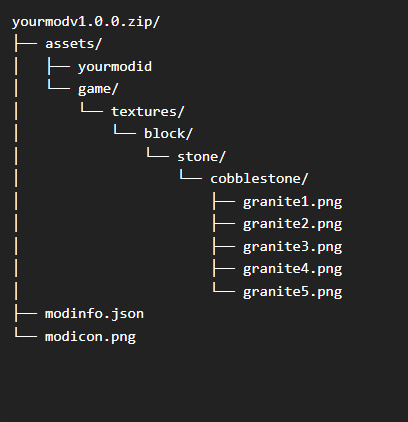
-
Patches not working in multiplayer
xXx_Ape_xXx replied to Slye_Fox's topic in [Legacy] Mods & Mod Development
Changing textures need to be done server side, because all the information of how a block/item etc should render, is transmitted from the server to the client in a multiplayer setting. The reason it works in singleplayer is simple, you ARE the server, as well as the client. Change it to "Universal", and it should be fine. -
Hm you have a point.. I remember trying to do something similar some time ago, and never got it to work until I listed everything separately, but I might have just missed something or got the syntax wrong.
-
Can't use { } to dynamically declare variants when using inventorystacks, you have to list them separately. Hard give more advice without seeing the entire json for the vessels..
-
Mod recommendation for displaying "Butterfly Pins"
xXx_Ape_xXx replied to Professor Dragon's topic in Questions
-
Anybody else notice that Dave is missing?
xXx_Ape_xXx replied to Teh Pizza Lady's topic in Discussion
I swear, Dave's following me...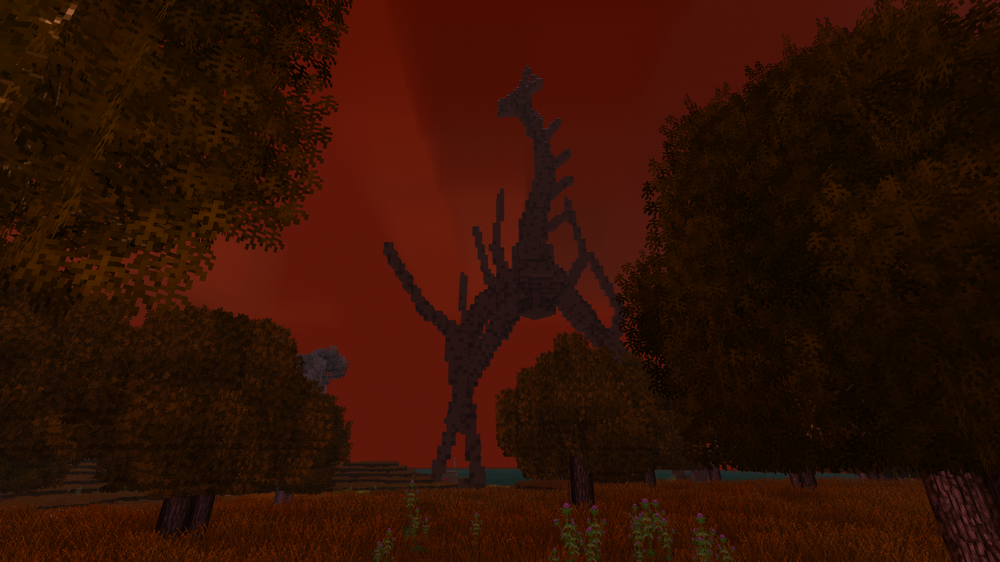
-
help with making a recipe
xXx_Ape_xXx replied to Straille's topic in [Legacy] Mods & Mod Development
It depends on your custom block and if it has variants for each cardinal direction? Like, is this the correct key for your block? bedshortopengreen-bedshortopengreen-head-north It's hard to know without seeing your full json for the block. -
help with making a recipe
xXx_Ape_xXx replied to Straille's topic in [Legacy] Mods & Mod Development
You're not addressing the attributes correctly. Try this: { "ingredientPattern": "B", "ingredients": { "B": { "type": "block", "code": "game:clutter", "attributes": {type: "bed-short-old", "collected": true}, "quantity": 1 }, }, "width": 1, "height": 1, "shapeless": true, "output": { "type": "block", "code": "liberatedbeds:bedshortopengreen-bedshortopengreen-head-north", "quantity": 1 } } -
How do I create a superflat world that is more than 3 blocks deep ?
xXx_Ape_xXx replied to Etwahl's topic in Questions
Might be a limit for how many layers there can be, I didn't look that much into the code for chunk layer generation. Try reducing your layers to below 32, since that seem to be the amount that do get generated. -
How do I create a superflat world that is more than 3 blocks deep ?
xXx_Ape_xXx replied to Etwahl's topic in Questions
Try removing all the comments, they were only there for a quick explanation of what direction it builds the layers. -
Go deep... deeeeep....
-
How do I create a superflat world that is more than 3 blocks deep ?
xXx_Ape_xXx replied to Etwahl's topic in Questions
You can easily make a custom layers.json file and replace the one found in "assets/creative/worldgen" folder. { "code": "superflatworldgen", "blockCodes": [ "rock-granite", // bottom layer "rock-granite", // more stone "soil-medium-normal", // dirt "soil-medium-normal", // more dirt "soil-medium-normal", // even more dirt "soil-medium-normal" // surface layer ] } This will generate a 6 layer thick world, with two layers of granite rock at the bottom, then 4 layers of soil. This file can have as many layers as you like, with a limit of the world height (usually 256). Go wild.. EDIT: Remove the comments, they are just there for explanation of what direction it builds the layers!! -
Ah yes, the everlasting battle of removing beams.. I've lost my hair from battling these buggers a long time ago, they still haunt my dreams to this day. It seem you have tried everything I'd advice and do myself when cursing at the screen because they get placed like a 5'yr old tossing them around like lego's. I feel your pain and join the suffering.. One thing (which you probably already have tried) I do, that sometimes help, is to equip the axe and wave around in the general area of where the beam was placed, while simultaneously adjusting the angle and position I view the beam. I find that the hitbox can sometimes only be targeted from a certain angle, and not necessarily the same angle you were standing in when placing the beam. And occasionally I find the hitbox be way off from the beam itself. It's not much of a tip, but worth mentioning at least.. I wish you godspeed and good luck in your search for the allusive beam hitboxes! May the maker have mercy on your sanity..
-
Try Accessibility Tweaks It lets you lower or mute individual sounds.
-
I'm disappointed by the bottom and top roof shapes
xXx_Ape_xXx replied to Johnny Blood's topic in Questions
It didn't require rocket science to make that mod, that's for sure Why it isn't vanilla, only the devs can answer.. -
Paying for help with new item models and .json for my mod.
xXx_Ape_xXx replied to Velynicus's topic in Discussion
Drop me a DM, I might be able to help you out. -
I agree, I liked the new rounded moon. It was still clearly pixelated, so I think it fit perfectly with the rest of the aesthetics of the game.
-
Mod Idea: A Dynamic Manure & Fertilizer System
xXx_Ape_xXx replied to Jakub Essa's topic in [Legacy] Mods & Mod Development
Maybe not 100% what you suggested, but it's fairly close. Here you go: Natural Fertilizer Now get out there and clean them pens, cause the animals be messy little buggers- 1 reply
-
- 1
-

-
Have you contacted support with a ticket, to have them look into your problem? If not, you can do so here: Create support ticket!
-
Already a mod for this: Prospect Together
-
When in creative, hit the | key to open world-edit, and adjust the fog to your liking in the provided menus.
-
Need help identifying source of CTDs
xXx_Ape_xXx replied to ProfessorFluffytail's topic in [Legacy] Mods & Mod Development
Hi and welcome to the forums First of all, you got several versions of some mods: 16.9.2025 08:45:03 [Warning] Multiple mods share the mod ID 'xlibrabite' ('xlib_v0.8.20', 'xlib_v0.8.20.zip'). Will only load the highest version one - v0.8.20. 16.9.2025 08:45:03 [Warning] Multiple mods share the mod ID 'xskillgildedpatch' ('xSkillGildedpatch', 'xSkillGildedpatch.zip'). Will only load the highest version one - v1.1.1. 16.9.2025 08:45:03 [Warning] Multiple mods share the mod ID 'xskillsrabite' ('xskills_v0.8.23', 'xskills_v0.8.23.zip'). Will only load the highest version one - v0.8.23. 16.9.2025 08:45:14 [Warning] Multiple mods share the mod ID 'armory' ('armory_0.2.4.zip', 'armory_1.1.1.zip'). Will only load the highest version one - v1.1.1. 16.9.2025 08:45:14 [Warning] Multiple mods share the mod ID 'battletowers' ('battletowers_1.0.6.zip', 'battletowers_1.0.7.zip'). Will only load the highest version one - v1.0.7. 16.9.2025 08:45:14 [Warning] Multiple mods share the mod ID 'combatoverhaul' ('combatoverhaul_0.3.10.zip', 'combatoverhaul_0.7.1.zip', 'combatoverhaul_0.9.3.zip'). Will only load the highest version one - v0.9.3. 16.9.2025 08:45:14 [Warning] Multiple mods share the mod ID 'exoskeletons' ('exoskeletons_0.3.0.zip', 'exoskeletons_0.4.2.zip'). Will only load the highest version one - v0.4.2. 16.9.2025 08:45:14 [Warning] Multiple mods share the mod ID 'facop' ('FA CO_Compatibility_Eldred_1.2.0.zip', 'FA+CO_Compatibility_Eldred_1.0.0.zip'). Will only load the highest version one - v1.2.0. 16.9.2025 08:45:14 [Warning] Multiple mods share the mod ID 'rivers' ('rivers_4.1.0.zip', 'rivers_4.7.2.zip'). Will only load the highest version one - v4.7.2. 16.9.2025 08:45:14 [Warning] Multiple mods share the mod ID 'spawnersapi' ('spawnersapi_1.1.3.zip', 'spawnersapi_1.1.4.zip'). Will only load the highest version one - v1.1.4. 16.9.2025 08:45:14 [Warning] Multiple mods share the mod ID 'xinvtweaks' ('xinvtweaks_1.8.1.zip', 'xinvtweaks_v1.8.1.zip'). Will only load the highest version one - v1.8.1. 16.9.2025 08:45:14 [Warning] Multiple mods share the mod ID 'xlibrabite' ('xlib_v0.8.20', 'xlib_v0.8.20.zip'). Will only load the highest version one - v0.8.20. 16.9.2025 08:45:14 [Warning] Multiple mods share the mod ID 'xskillgildedpatch' ('xSkillGildedpatch', 'xSkillGildedpatch.zip'). Will only load the highest version one - v1.1.1. 16.9.2025 08:45:14 [Warning] Multiple mods share the mod ID 'xskillsrabite' ('xskills_v0.8.23', 'xskills_v0.8.23.zip'). Will only load the highest version one - v0.8.23. You either have the same mods in two different directories, or you have more than one version of the same mod in one. If this is also the server, it might cause issues for sure. Regarding the error, you did not include any crash log, so what ever caused the crash is very hard to figure out from what we got here. -
Variants for grass overlays
xXx_Ape_xXx replied to Slye_Fox's topic in [Legacy] Mods & Mod Development
Just made a quick test, and yes, you can use variants for the grass textures. [ { "enabled": true, "side": "universal", "file": "game:blocktypes/plant/tallgrass.json", "op": "addmerge", "path": "/texturesByType/*-free/north", "value": { "alternates": [ { "base": "block/plant/tallgrass/{cover}/{tallgrass}1-north" } ] } }, { "enabled": true, "side": "universal", "file": "game:blocktypes/plant/tallgrass.json", "op": "addmerge", "path": "/texturesByType/*-free/south", "value": { "alternates": [ { "base": "block/plant/tallgrass/{cover}/{tallgrass}1-south" } ] } } ] This will patch the vanilla tallgrass.json, and insert alternative textures for each variant. Just make the textures and place them inside "assets/game/textures/block/plant/free/" inside your mod. Remember to also make textures for snow cowered versions. Have the above patch inside "assets/your-mod-id/patches/" and you should be golden. Hope that helps -
Add handbook title and text?
xXx_Ape_xXx replied to Frepo's topic in [Legacy] Mods & Mod Development
Very useful info @DavidLokison, thank you for figuring this one out. I've been tearing my hair out (what's left of it) many times, trying to find out why my text isn't showing up in the handbook. Hope the PR gets accepted and implemented!