Professor Dragon
-
Posts
736 -
Joined
-
Last visited
-
Days Won
4
Content Type
Profiles
Forums
Blogs
News
Store
Everything posted by Professor Dragon
-

new mechanics More Canadians animals!
Professor Dragon replied to Ezequiel Mortaloni's topic in Suggestions
As a side note, there is no indication that we are in a world where "Canada" ever existed. But as there are wolves and bears and other current Earth-like animals, I don't see that as a barrier.- 10 replies
-
- 2
-

-

-
- animals
- more realistic
- (and 1 more)
-
Okay. I see that I got confused when you said "So since the hats got rain protection and warmth, I was bent about my hunter hood not getting it. " that you were specifically concerned about the "rain protection" missing from the Hunter's Hood, not the warmth. I agree with you - the "Hunter Hood: should get rain protection. I think it is okay otherwise that different headgear has different "rain protection" and "warmth" values. After all, a fancy indoor hat might offer no rain protection while being warm. Here is my list of which hat or hood has what on v1.21.1 stable from the Creative menu. As I said before, it really is a mixed bag. I didn't check which ones are available in a Survival game. And the Nadiyans sure liked their hats. Clothing Item Rain Protection Warmth (C) Hunter hood None 0.0 Squire hood None 1.0 Nadiyan alchemist hood None 0.3 Nadiyan barber hood None 0.3 Nadiyan beekeeper hood 70% 0.0 Nadiyan blacksmith hood 70% 0.0 Nadiyan musician hood None 1.0 Barber surgeon mask with hood None 1.0 Rotwalker hood None 1.0 Scribe hood None 1.0 Roll hat 50% 0.0 Minstrel hat 50% 1.0 Messenger hat 50% 0.0 Merchant hat 50% 1.0 Lackey hat 50% 1.0 Jailors hat 50% 1.0 Gem encrusted fur hat 50% 1.0 Nadiyan alchemist hat 70% 1.0 Nadiyan barber hat None 1.0 Nadiyan fisher hat 85% 1.0 Nadiyan hunter hat 85% 1.0 Nadiyan inkeeper hat None 1.0 Nadiyan miner hat 70% 1.0 Nadiyan musican hat None 1.0 Tan Nadiayan peasant hat 50% 1.0 Blue Nadiayan peasant hat 50% 1.0 Tan Nadiayan peasant hat 50% 1.0 Beige Nadiayan peasant hat 50% 1.0 Red Nadiayan peasant hat 50% 1.0 Brown Nadiayan peasant hat 50% 1.0 White Nadiayan peasant hat 50% 1.0 Nadiayan shepherd hat 70% 1.0 Nadiayan tailor hat None 1.0 Brown Nadiayan fur-lined hat 85% 1.5 Blue Nadiayan fur-lined hat 85% 1.5 Straw hat 85% 1.0 Top hat 70% 1.0 Bamboo cone hat 85% 1.0 Alchemist hat None 0.0 Bamboo cone hat (large) 90% 1.0 Most helmets None 0.0 Bear hide helmets None 1.0 As I said, it is pretty mixed, and you can definitely make some arguments about what should have what. The poor old Messengers for example, out in all weathers at the end of the world you imagine, had worse hats than Lackeys who probably served indoors. Same with the Merchants. Out in all weathers, and can't match a Straw Hat? The Straw hat wins hands down as the easiest to obtain hat with the best stats. The Bamboo cone hat (large) offers the best weather protection in the game. (Not much good in wind though I wouldn't think! Should there be a wind mechanic hat penalty to reduce the warmth from hats? Fine in calm wind, nothing in a hurricane?) Your best warmth AND rain protection options bar none are the Nadiyan fur-lined hats, but as the game help says that they are available from a "Tailor", I'm not sure if you can actually get them in-game (?). There is no recipe and there is no such Trader as a "Tailor" I don't think - there is a "Clothing" trader. There is some question in my head whether items such as the "Hooded cape" or any body party that is a cape or cloak with a hood should give rain protection. It makes sense to me. Currently, they don't. Bear hide helmets are your go-to choice for very cold regions due to being the only helmet with a warmth bonus. You'd think that some of the helmets would also offer a little rain protection - but I'm having trouble picturing in general how you combine helmets and hats, and yet it happens. Lots of Seraphs walking around double-head gearing it. I'm curious why there aren't apostrophes in same of the names - such as "Jailors' hat" instead of "Jailors hat." But then again, I'm curious as to why some of the hats are plural in the first place compared to others. See "Lackey hat" versus "Jailors hat." There is definitely more than one Lackey - the Handbook tells us so. Anyway, top of my head, that's hats wrapped up. Definitely scope for debate and tweaking. Professor Dragon.
-
I think warmth is a separate request. The 1.21.n updates were about the new feature rain protection only: Tweak: Hats now provide protection from rainfall Looking in Creative I see that hats and hoods are a big ol' mixture of things receiving rain protection or warmth. Looking at the Hunter Clothing in general, it already has the highest warmth bonus out of the gate at 9.3 C. Warmth from gear Hunter hood 0 Hunter face mask 0.3 Hunter poncho 1 Hunter shirt 2 Hunter coat 2 Hunter gloves 0.5 Hunter leggings 2 Hunter boots 1.5 TOTAL 9.3 Looking at Malefactor, it gets 8.6, and these people also have survival skills. Warmth from gear Malefactor heavy cloak 0.5 Malefactor whitewood mask 0.3 Malefactor bloody pendant 0.0 Malefactor shirt 2.0 Malefactor leather tunic 2.0 Malefactor wrapped gloves 0.5 Malefactor trousers 2.0 Malefactor sash 0.3 Malefactor wrapped boots 1.0 TOTAL 8.6 Plus our shirt forever reads "Undergarments stained with sweat" no matter HOW MUCH I repair it. If we're putting in requests, I would like the option for a brand new clean Malefactor Shirt to be craftable or available from a Trader or an upgrade to the existing shirt. In short, I think you'd need a separate request for Hunter's Hood to get a warmth buff. Professor Dragon.
-
Does anyone else think that the cattail reeds "flicker" more on 1.21.n than 1.20 when harvested?
-
new mechanics More Canadians animals!
Professor Dragon replied to Ezequiel Mortaloni's topic in Suggestions
Those builds are amazing.- 10 replies
-
- 1
-

-
- animals
- more realistic
- (and 1 more)
-
You'd also need a mod to keep the room counting as a room, most likely. eg https://mods.vintagestory.at/heatretention https://mods.vintagestory.at/cbr
-
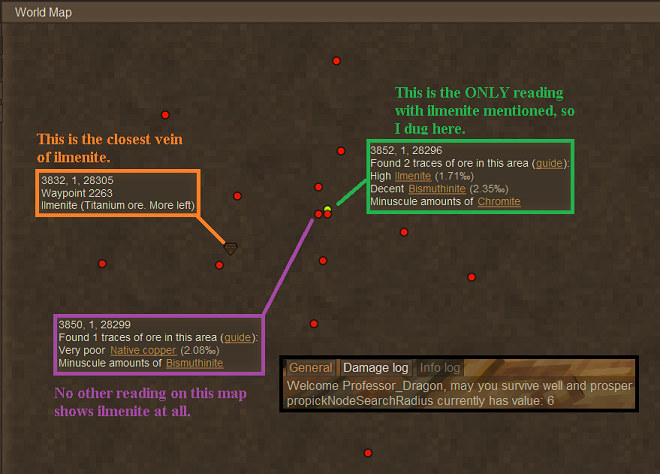
I wish that I had that luck. Here is my latest search. A while ago (Maybe on the prior version v.1.21.0 stable???), I found and marked a High ilmenite reading near my base. The rest of the ProPick results are on current version v1.21.1 stable NOT ONE has an ilmenite reading. This makes sense (maybe) compared to the findings, but doesn't gel with the first result (?) Digging at the High reading didn't find anything. I used the ore finder (mod Block Overlay), and the closest vein of ilmenite is marked. The closest reading to it showed a Very Poor reading for Copper and trace amounts for Bismuthinite. I dug down to where the vein was - Block Overlay was correct. ProPick Node Search from within six blocks FAILED to pick it up from one block away. I wish I took a screenshot. Using ProPick again on different blocks close to the vein DID pick it up after that. I don't know? Professor Dragon.
-
How to remove the darkness in cave and during the night 1.21
Professor Dragon replied to La_Racl3tte's topic in Discussion
Progress! Keep us posted. I see engagement on that thread. -
Not to hijack this thread, but I've been wanting to vent for a while, and this kind of gives me the opportunity. What are peoples' experience with the Propick? In my hunt for Magnetite, I sank shaft after shaft into the highest "Decent" reading (after smothering the area with Distribution checkings) and found nothing. I think three (?) Black Bronze pickaxes were used. (Thanks, Survival Goods Traders.) Another area that was "Poor" I stumbled upon my first large haul, that let me enter the Steel Age. But then another area (I know what I'm doing now!) turned up EMPTY, even though there was Very High chance of Magnetite and Ultra High chance of Cassiterite. So, I downloaded an X-Ray mod called Block Overlay and went into my Test world. https://mods.vintagestory.at/xray And I tried prospecting again, and checking my Pro-Pick Distribtion and Node results against what was found. Now, I know how Prospecting is SUPPOSED to work. Distribution gives the CHANCE of "there might be none, even though you get a good reading" and "Node" is "always right, if you are within range. But in my Test world, a Distribution check gave no results, while standing literally in the middle of the biggest Magnetite vein I've seen. So I sent back to my real world (I'd had enough by this time), and checked. There was nothing near my original Decent Magnetite reading. There was nothing near my Very High Magnetite reading and the nearest Cassiterite to the Ultra High reading was 140+ blocks away. Now . . . that is a very small sample size. But honestly, it has been a frustrating experience and it would be nice if the Density Search were "a little more accurate." Would it kill it to have an extra setting where you could do a Density Search, but it actually checked broadly the chunks around and gave a yay/nay to it? I like to think of myself as a "give everything a decent go" type of player. But I'm pretty sure that many people would have given up long before this. /rant Thanks for listening. Professor Dragon.
-
How to start a server with more days per month(bisect hosting)
Professor Dragon replied to VeeFullOfGlee's topic in Questions
I don't use Bisect Hosting, so this is just my internet search skills and Vintage Story knowledge. You are probably best to accept the jump forward in a year, and use the time commands to jump FURTHER forward to the next Spring. Yes, your Year start date will be one further along, but what of that? Here are the Bisect Hosting time commands: https://www.bisecthosting.com/blog/vintage-story-commands-server-client-command-cheats And use this command to nudge the month forward to where you want it: /time setmonth [jan|feb|mar|apr|may|jun|jul|aug|sep|oct|nov|dec]: Sets the calendar to the given month of the year The only other possibility that I see is to set you desired month, along similar lines to this page (but the example is for a different option): https://www.bisecthosting.com/clients/index.php?rp=/knowledgebase/878/How-to-configure-the-playstyle-of-a-Vintage-Story-server.html But then most importantly: "Servers must be regenerated to configure playstyle; this can be accomplished by Resetting the Server." https://www.bisecthosting.com/clients/index.php?rp=/knowledgebase/610/How-to-completely-reset-a-Vintage-Story-server.html Which if my understanding is correct, lets you set the config files and then build a world from those config files. But as I said, I've never done this. Professor Dragon. -
How to display Treasure Map on wall in vanilla.
Professor Dragon replied to Professor Dragon's topic in Guides
Perhaps an inventory item reward of a map could be generated once you complete the objective? A displayable wall map that shows your World Map terrain (only - no waypoints) scaled to display on one block (no matter the distance), with two extra features. The caravan icon where you were given the map by the trader The current red X (or appropriate mark) where the story event is located. In general, player maps and player wall art are something that would be "nice to have."- 8 replies
-
- 1
-
-
- item frame
- map
- (and 3 more)
-
How to remove the darkness in cave and during the night 1.21
Professor Dragon replied to La_Racl3tte's topic in Discussion
Is that YOUR report? If yes, update it with more info. If no, then log your own. Be sure to include logs. I'm guessing that it is not yours, because you don't mention that putting "minbrightness" to an integer allows it to work, which is the implied case there. Nor confirm that it is exactly the same error message. The only common description in the black screen, but that is too broad. You've got nothing to lose by logging a separate thread. At worst, a dev. will flag it is a duplicate and link it to this one if it contained the same details. Professor Dragon. -
Oh, COME ON @Diff - now I want to know what happened! Did you make it out? ? ?
-
How to remove the darkness in cave and during the night 1.21
Professor Dragon replied to La_Racl3tte's topic in Discussion
Disclaimer - graphics issues are not my thing. Did you send the bug report, or someone else? If you haven't put your own through, I suggest you do that, that way you can provide your own client logs which will be a lot more useful to anyone looking at it. Without knowing your o/s, graphics card, settings etc, there's a lot of things it could be. Also, please provide the GitHub link you mentioned. Here is an example: Game won't start: OpenGL errors on startup [fixable with a PC re-start, or by updating graphics driver https://github.com/anegostudios/VintageStory-Issues/issues/6888 The above was mentioned in the latest stable patch, which you should get if you haven't. It contains this line, which is in-line with updating the graphics driver as a first step. Fixed: OpenGL errors at game start were sometimes wrongly appearing as 'Context profiles only defined for OpenGL version 3.2 and above', potentially masking the true OpenGL error report. [In general any OpenGL error at the start is fixable by re-starting the computer or updating the graphics driver, see Github #6888] But in any case, the logs will contain useful information to those who know what to look for. There is also general web searching for similar issues, but I'm guessing you've tried that. Professor Dragon. -
"Tweak: Artisan trader no longer sells complete tile blocks, but individual tiles, that player must then craft into blocks or slabs (using mortar). " What does this cover? I'm looking at the Wiki Selling list for the Artisan Trader and don't see either block nor tile mentioned: https://wiki.vintagestory.at/Trading#Artisan
-
Don't know. There has been some change to lighting presumably, because of this line: "Tweak: Color grading fine tuning. Should fix cases of extremely bright fog " My observations are that the inside of my house lit by lanterns is very bright at the moment, almost too bright. On the other hand, I went mining and my torches weren't lighting up far at all. But then next day they were doing what they normally do. Barring a dev. chipping in, I'd say to keep an eye on it. Try in different locations and different weather conditions. Bad weather outside (fog, rain) has previously been really bad on my world for impacting interiors where sunlight doesn't reach.
-
How to remove the darkness in cave and during the night 1.21
Professor Dragon replied to La_Racl3tte's topic in Discussion
Can you screenshot what you see? The title screen being dark sounds odd. Otherwise, it is meant to be dark in caves or at night. But the title screen? Maybe a graphics/display issue. -
You nailed it. "You have used 48.8 MB of your 48.83 MB attachment limit. " Okay. How do you guys work around this? I can go back and resize my prior images to a lower resolution format. Do you link out to an attachment site? I can see myself hitting a limit again even with some image management. Thanks.
-
Hi Everyone, A forum question. I used to be able to insert images, but am now getting a message for ANY size attachment of: "1 file would exceed the total allowed size of 29.872kB, and was skipped" (sic) This applies whether it is a 2.9 MB .png file or a 46 KB .jpg or .jpeg, by any attachment method (drag files, choose files, other media). This has only occurred in the past week for me. I also tried using a "New private window" in Firefox and logging in again, so as not to keep cookies, and same issue. I also used a different browser that I have never used to log in to the Vintage Story forums, and same thing. This happens in at least the "Questions" and "Discussion" branches of the forum. Thanks.
-
Now, now. The question was in good faith and looks a reasonable thing to discuss.
-
I know that I've been conditioned to: Always look at a "dead" block when I have anything in my hand that I wish to interact with eg look at wall or ground to eat food Never have a dirt block in my hand and attempt to run through a series of gates Make of that what you will. The one that tripped me up just five minutes ago was activating a bed instead of the torch that was in front of it. I know that a family member would instantly (and harshly in my view) feel free to classify that as a "Skill issue."
-
Yes to both. Although if there is nothing you're really keen on, you could let the early adopters go first. But take a backup if you're at all concerned - good practice in any case.
-
> Fixed: Grass or snow blocks sometimes floating in the air. Huzzuh! Appreciating this fix. Going through the rest of the list now. > Provide 50% rain protection for all the other hats (some already had it in 1.21.0) Nice. I've really been enjoying the rain protection. Happy it has been extended. Time to get my merchant hat out of the closet. > Fixed: Items would occasionally not be visible Glad to see it! This is another long list of amazing changes, so close to the last release. Thank you! Professor Dragon. EDIT Floating grass that was introduced in the prior major update is still present in the current patch. Is the patch just preventative to stop new grass from floating, or should it have addressed prior floating grass? I'd attach an image, but I'm having trouble getting past the size restriction, even though the size is met. EDIT TO EDIT Checked the patch notes on GitHub. "radfast Confirmed: the fix for this is included in game version 1.21.1 released today, so it should not happen again. However, existing floating grass/snow blocks will remain and will have to be manually deleted, sorry 'bout that!" So I'm going to leave my patches of floating grass, as just evidence of more temporal shenanigans in a broken world. They can fit right in with the floating mountains, odd vertical chunk borders and . . . monsters.
-
What is the logic for surface level temporal stability?
Professor Dragon replied to Broccoli Clock's topic in Questions
You look to be right there. But it is a temporal gear . . . there is a good chance it was messing either with my memory or my vision. -
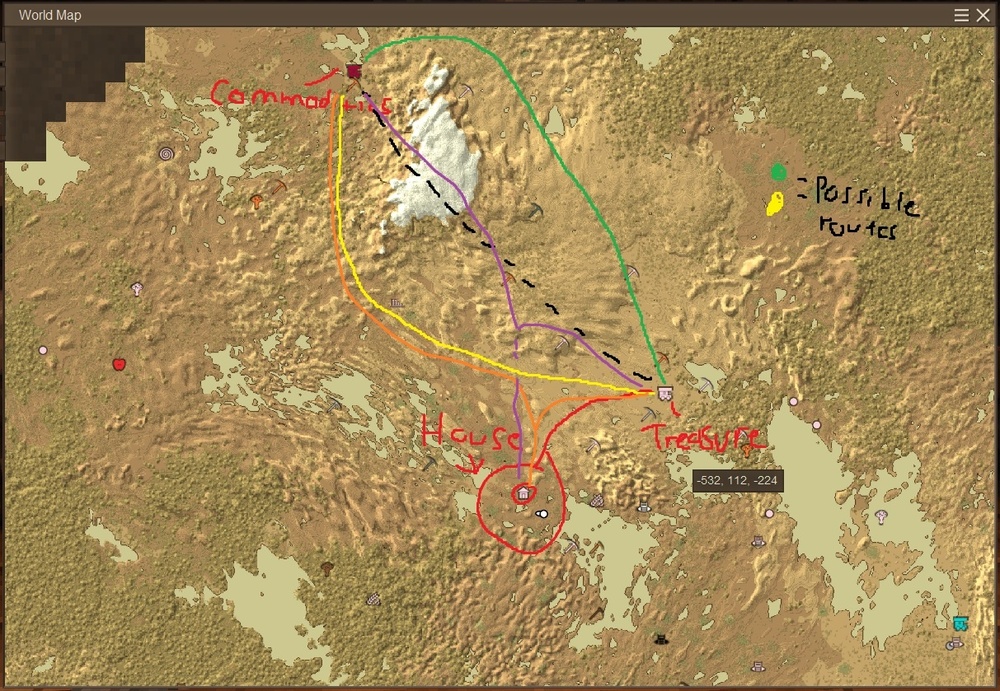
Barring "Points of Interest" or "Things to Avoid", I'd look either into the yellow route, or a combo yellow/overland along black dotted line. My reason is that the yellow route allows you a more direct route to the Commodities Trader from your House, and you won't always be visiting the Treasure Hunter trader. The green line is just further out of the way. You can also stop off along the way at those Ruins and loot or repair them. I've adjusted the yellow route into an orange one. And I've coded the "combo" route as purple below. Funnily enough, really steep cliffs are sometimes not as bad as rugged terrain, because you just ladder straight up them. I'd avoid tunneling myself. This is not Minecraft where light and tool use is trivial by comparison. I'd also keep an eye out for a Survival Goods Trader - they've got useful stuff. And a Clothing Trader pairs well with a Commodities Trader. But really, there are no wrong choices. Have fun!