


Spear and Fang
-
Posts
493 -
Joined
-
Last visited
-
Days Won
8
Content Type
Profiles
Forums
Blogs
News
Store
Everything posted by Spear and Fang
-
New version. Bump!
-

no animals were harmed Primitive Survival
Spear and Fang replied to Spear and Fang's topic in Mod Releases
Yes, that sounds even better (less performance intensive) than adding a listener - just adding more possibilities of what happens when an entity collides with a trap. I'm on it - thanks again! -
no animals were harmed Primitive Survival
Spear and Fang replied to Spear and Fang's topic in Mod Releases
Hi Pamela, For Windows, you'll have a folder up one level from your mods folder called ModConfig i.e. C:\Users\<userid>\AppData\Roaming\VintagestoryData\ModConfig In that folder you should see several .json files, and maybe some folders (depending on which mods you have installed). The names of the files/folders will be a dead giveaway as to which mod they belong to. You can edit those json files with your favorite text editor (notepad?), since they are really just text files. A few caveats - don't change the overall structure of the files or remove or add rows, only change the assigned values. i.e. You could change a true to a false, or an integer to a different integer, or a decimal to a different decimal. For example, a number like 0.3 could be changed to 0.5 or 1.0, but don't change it to .5 or 1 - keep the overall "look" of the number the same. Likewise, don't change a number like 5 to 5.5 or 6.0, it's probably expecting a whole number like 6. If things go awry, you could delete the file completely, and the next time you start the game the file will be recreated in that same location with the original (default) values. -
no animals were harmed Primitive Survival
Spear and Fang replied to Spear and Fang's topic in Mod Releases
Thank you for the kind words and the valuable feedback! I have indeed made fishing highly customizable and I believe that any concerns you've had in the past related to that have been addressed (although finding the *best* settings for your world might be a bit of a challenge) . The chunk based depletion/repletion system will help a lot, as will the reintroduction of slippery fish and their ability to immediately escape. Traps are a different story entirely and are a little harder to reign in because they're simply blocks that damage entities that collide with them, so they depend mostly on what's going on in the surrounding area. An entity would rarely collide with an unbaited trap, and almost always collide with a baited trap because a baited trap is simply a point of interest (like a trough full of food, except that all entities are attracted to it). They seem to be either highly effective or highly ineffective, depending upon what creatures are normally spawning in that area (I'm looking at you, butterflies!). I have added a few customizations for each of the trap types, so simply decreasing the maximum amount of damage they inflict *may* be enough to help balance that out. I'll give some thought into adding a (configurable) percentage chance that bait can be stolen from traps as well. That may really help out with their effectiveness. I will elaborate on some of these configuration settings soon, and others are pretty self explanatory. "AltarDropsGold": true, "DeadfallMaxAnimalHeight": 0.7, "DeadfallMaxDamageSet": 10, "DeadfallMaxDamageBaited": 20, "FallDamageMultiplierWoodSpikes": 25, "FallDamageMultiplierMetalSpikes": 80, "FishBasketCatchPercent": 5, "FishBasketBaitedCatchPercent": 10, "FishBasketBaitStolenPercent": 5, "FishBasketEscapePercent": 15, "FishBasketUpdateMinutes": 2.2, "FishBasketRotRemovedPercent": 10, "FishChanceOfEggs": 20, "FishChunkDepletionRate": 5, "FishChunkRepletionRate": 1, "FishEggsRepletionRate": 10, "FishRepletionMinutes": 15, "FishChunkMaxDepletionPercent": 95, "LimbTrotlineCatchPercent": 5, "LimbTrotlineBaitedCatchPercent": 10, "LimbTrotlineLuredCatchPercent": 10, "LimbTrotlineBaitedLuredCatchPercent": 15, "LimbTrotlineBaitStolenPercent": 5, "LimbTrotlineUpdateMinutes": 2.4, "LimbTrotlineRotRemovedPercent": 10, "RaftWaterSpeedModifier": 0.2, "RaftFlotationModifier": 0.03, "SnareMaxAnimalHeight": 0.8, "SnareMaxDamageSet": 12, "SnareMaxDamageBaited": 24, "WeirTrapCatchPercent": 5, "WeirTrapEscapePercent": 10, "WeirTrapUpdateMinutes": 2.6, "WeirTrapRotRemovedPercent": 10, "WormFoundPercentRock": 6, "WormFoundPercentStickFlint": 16 -
no animals were harmed Primitive Survival
Spear and Fang replied to Spear and Fang's topic in Mod Releases
I made some changes to the pre-release, as outlined below (mostly for my own reference) - Testing under 1.15.0-pre.6 unstable: New: Added chisel -> metal bits grid recipes for hooks, lures, nails, spikes, and bed-o-nails (but not metal bucket handles or metal buckets). New: Added new wood types to raft recipe New: Default raft speed modifier from 0.5 -> 0.2 wth? Fixed: Recipes for new lantern wood types New: Added raft recipes for new wood types Fixed: Eating fish eggs/caviar was a bit of a hot mess PrimitiveSurvival-2.5.7-unofficial2.zip -
no animals were harmed Primitive Survival
Spear and Fang replied to Spear and Fang's topic in Mod Releases
For anyone who's feeling brave/bold, here's the pre-release of the next version. I'm going to test it over the next week or so and then release something official. PrimitiveSurvival-2.5.7-unofficial.zip What to expect - nothing terribly exciting: Version 2.5.7 Updates - testing performed under v1.15.0-pre.3 (unstable) New: Common configuration file ..\VintagestoryData\ModConfig\primitivesurvival.json to configure raft speed, prevent altars from dropping gold, customize traps and fishing - thanks @techrabbit, @Quixjote New: Fish chunk depletion/repletion, thanks @Gox New: Filleting fish sometimes drops fish eggs, either raw or ovulated. They can be eaten raw, cooked, or salted to make caviar. Ovulated eggs can be thrown into water to replete fish stocks in that chunk. New: Slippery fish are back, but a lot less slippery. If they land in water, they will immediately escape and replete the chunk. New: Fish can be thrown in water to replete the chunk. Might make sense for smaller fish (release and catch something bigger). New: Fish eggs can be used as bait. New: Decreased default raft speed New: Polish translation courtesy of @qexow! New: Refactored code/leveraged Capsup's VS Mod Template: https://gitlab.com/vsmods-public/foundation/vsmodtemplate - - Thanks @Capsup! New: Right click pick up raft - thanks @PapaCheddar New: fish fillets as bait for traps and fishing - thanks Ketrai New: more sound effects for fish traps and raft New: Added blood block/portion - creative only item for now, intended for worldgen New: Bald cypress, Larch, Redwood, Ebony, Walnut, Purpleheart wood lantern Variants Fixed: Bug in German language file - thanks @Kiava Fixed: Raft not always reverting to default orientation (raft-north) when you break it - Thanks @Gox Fixed: fishing hooks, lures, nails, spikes dont smelt back into the original materials but some sub labeled material... (and wont stack with actual metal) - thanks @TechRabbit Fixed: changed POI on pit traps like I did to snares/deadfalls to eliminate the farm life conflict - thanks Thranos! Fixed: Reworked lantern recipe so handbook links would function correctly Tweak: Chunk system not unloading the fishing trap block entities correctly - fixed MAYBE? - thanks @Capsup Tweak: Different fish stack sizes - catfish = 16, bass,bluegill,mutated = 64, the rest = 32. Thanks @l33tmaan Tweak: Double the monkey bridge recipe output (yet again) - thanks @Quixote Tweak: Reworked fillets/fish jerky because fillet satiety in meals too low, fish jerky satiety too low - thanks @l33tmaan, others Tweak: Changed mold descriptions to like Raw blah blah instead of blah blah (Raw) as per game molds -
no animals were harmed Primitive Survival
Spear and Fang replied to Spear and Fang's topic in Mod Releases
Well thank you! And thanks for braving the uncharted waters of 1.15 pre-6 with my mod. -
no animals were harmed Primitive Survival
Spear and Fang replied to Spear and Fang's topic in Mod Releases
Hi Pamela, I've done only limited testing with 1.15.3 and the only issue I found was that wooden lanterns for the new wood types were...odd. Not game-breaking, just not displaying properly. I'd like to think that other than that the mod would work ok with the 1.15 releases, as I've built it to be fairly resilient and it survived the transition from 1.12 -> 1.13 -> 1.14 quite nicely. Having said that, I'm finishing up some last minute changes this week for the new release, and will be doing a lot of testing with the latest 1.15 release next week, so expect to see a brand new version in about 10 days. -
Better modding guide/tutorial?
Spear and Fang replied to JamesB's topic in [Legacy] Mods & Mod Development
Let me talk briefly about debugging. In the first example (where you put your mod directly in the mods folder), debugging is hard. Either the game crashes and you get a pop-up explaining why, or the issues are logged into C:\Users\<user>\AppData\Roaming\VintagestoryData\Logs, or both. I always start by looking at server-main.txt In the second example, the VSModLauncher intercepts a lot of that stuff and pukes it out into the Output - Debug window, so you can see what's going on behind the scenes while the game is running. That's really all that VSModLauncher is doing which is why you can promptly ignore it. You can add logging to your own code as well, i.e. System.Diagnostics.Debug.WriteLine("This variable:" + thisvariable); -
Better modding guide/tutorial?
Spear and Fang replied to JamesB's topic in [Legacy] Mods & Mod Development
I'm back. So then the question becomes - where do I go for the deets? If the class view - object browser isn't up your alley, you could look here instead. http://apidocs.vintagestory.at/api/index.html A lot of my learning is by example, so I've looked at a lot of vanilla code, and often the survivalmod, so I search here https://github.com/anegostudios and/or downloaded the code and search it offline. Other mods have helped tremendously, as well as searching the Discord. Oh, and autocomplete. In my mind, a guide for code mods can't exist because it's pretty limitless as to what you can do. -
Better modding guide/tutorial?
Spear and Fang replied to JamesB's topic in [Legacy] Mods & Mod Development
Here's a clue: The TrampolineBlock iinherits Block public class TrampolineBlock : Block And then we are overriding OnEntityCollide... public override void OnEntityCollide So if you search for onentitycollide in the Class View, we can get the deets...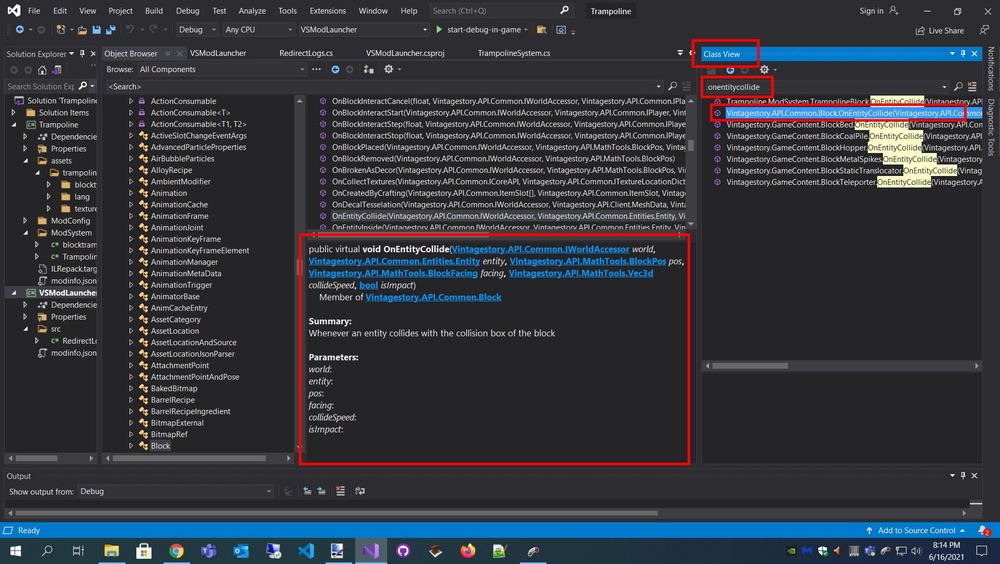
-
Better modding guide/tutorial?
Spear and Fang replied to JamesB's topic in [Legacy] Mods & Mod Development
I know you were asking for a lot more than this, but I'm missing the hockey game! -
Better modding guide/tutorial?
Spear and Fang replied to JamesB's topic in [Legacy] Mods & Mod Development
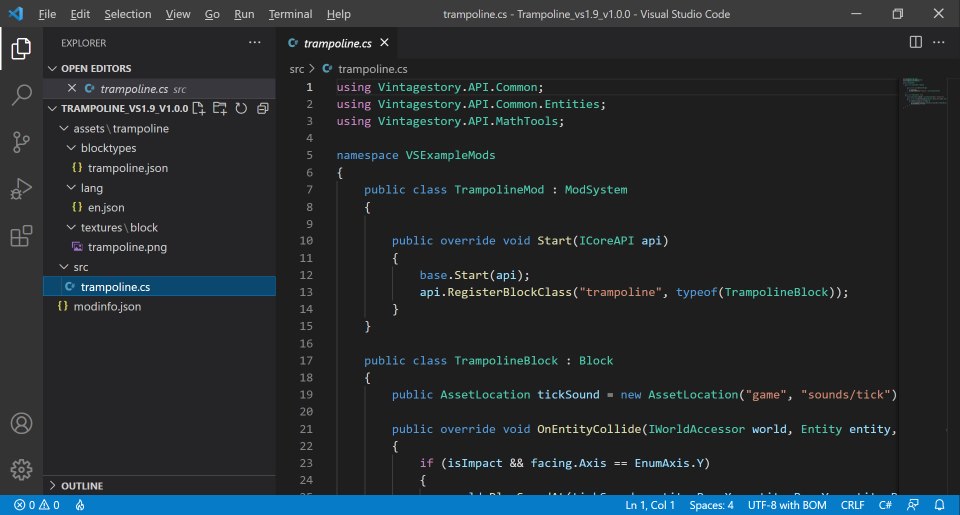
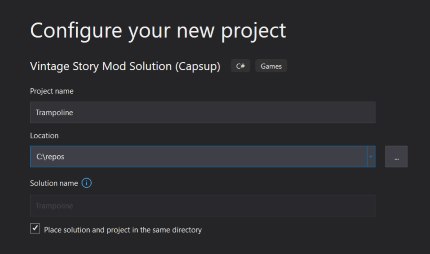
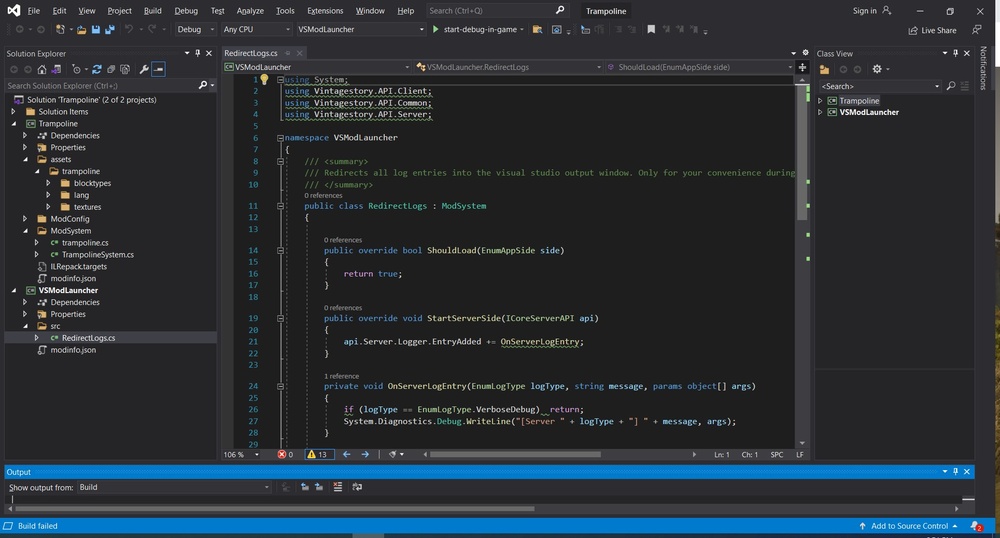
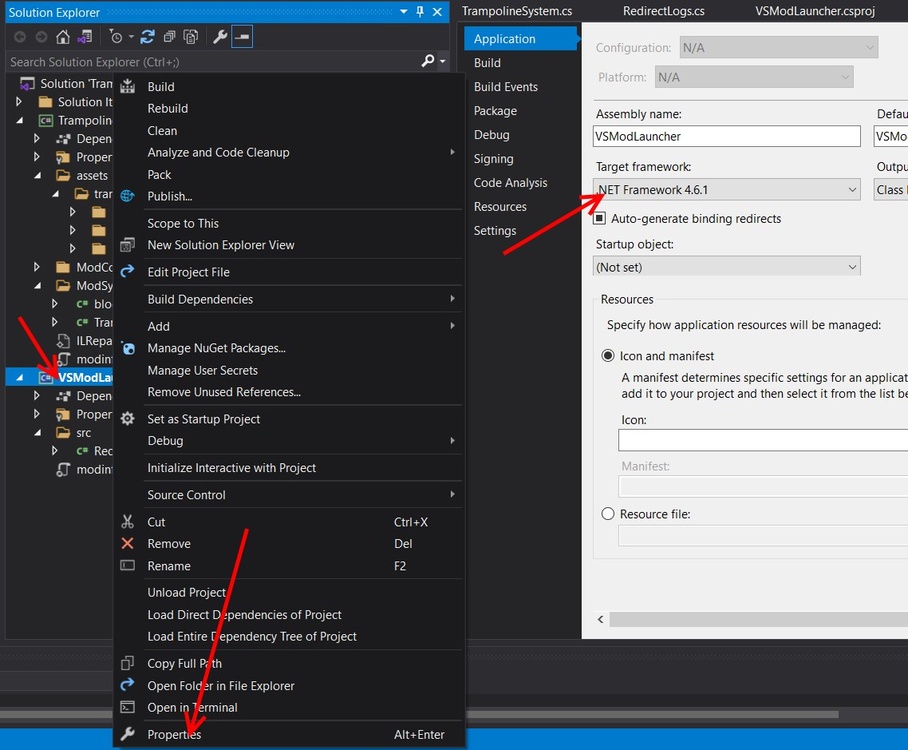
So let's talk about the trampoline mod in particular. At the bottom of that page, download the for VS v1.9 version of that. Now you can drop that zip file directly into your mods folder (C:\Users\<user>\AppData\Roaming\VintagestoryData\Mods ) and take it for a spin, but since the code isn't compiled (no .dll files), I like to unzip it first and drop THAT unzipped folder into the Mods folder instead. Fire up Vintage Story, check the Mod Manager to ensure that the Trampoline mod has loaded successfully. Start a new Single Player game (creative world), grab a couple of Trampolines and try them out. Since the folder is unzipped, it's easy to point your favorite editor at that folder (Visual Studio Code works great for this), and quickly make changes to code, assets, whatever, save them, and see what happens when you restart the game. CTRL-F1 for a quick restart. Sometimes I save and exit to retain the stuff that I've been mucking with in game. You can do almost anything imaginable with code, so I can't possibly dive too deeply into that. But a common use for code is attaching it to assets, just like the trampoline does. If you look at trampoline.json, there's a class:"trampoline" that links the TrampolineBlock class to the trampoline.json asset. That link is finalized by registering the class (usually in the Start function) api.RegisterBlockClass("trampoline", typeof(TrampolineBlock)); In the json file, not only can you specify a class, but you can also link an entityclass, and one or more behaviors if need be. Those all need to be registered in your Start function, but slightly differently depending on what they are, i.e api.RegisterBlockBehaviorClass("RightClickPickupSpawnWorm", typeof(RightClickPickupSpawnWorm)); api.RegisterBlockEntityClass("bedeadfall", typeof(BEDeadfall)); api.RegisterItemClass("itemcordage", typeof(ItemCordage)); api.RegisterEntity("entityearthworm", typeof(EntityEarthworm)); The wiki talks about the purposes of these different classes so I'm not going to go into that. ---------------------------------------------------- If we want to migrate this trampoline mod into Capsup's template (so we can do a deep dive into the code, use modern c#, debug, automatically create deliverables, and more)... https://gitlab.com/vsmods-public/foundation/vsmodtemplate 1. Setup Visual Studio as per Cap's instructions 2. Start a new project using his template 3. I like to use a location that's not nested so deep, so like C:\repos 4. Go with the defaults after that. 5. Once the solution is loaded up, it might be easiest to close Visual Studio and use File Explorer to move the stuff in. In this case it's really only the contents of the assets folder. So move the trampoline folder from C:\Users\<user>\AppData\Roaming\VintagestoryData\Mods\Trampoline_vs1.9_v1.0.0\assets to C:\repos\Trampoline\Trampoline\assets The folder structure inside of assets has lots of naming conventions. See the wiki for that, or look at the the folder structure of the vanilla survival mod, or any other mod. 6. Copy the trampoline.cs file from C:\Users\<user>\AppData\Roaming\VintagestoryData\Mods\Trampoline_vs1.9_v1.0.0\src to C:\repos\Trampoline\Trampoline\ModSystem The structure of your c# files has no rules. You can put all the code in one file (like the trampoline mod does), but I like to break it up into a bunch of files, and even nest some of those files into folders based on what the code is doing. 7. Now delete the entire trampoline mod (Trampoline_vs1.9_v1.0.0) from your mod folder C:\Users\Administrator\AppData\Roaming\VintagestoryData\Mods If you leave that in there, or ever have two copies of the same mod accessible to the game at once you're in for a world of hurt. 8. Fire up Visual Studio again and open your trampoline project. You might see two projects (Trampoline.sln and Trampoline1.sln). Remove that Trampoline1.sln from your recent list. I don't know what the hell that is. My Visual Studio looks like this. I've expanded a bunch of folders on the left so you can get a look at what's where. 9. The first thing I *like* to do is tidy up RedirectLogs.cs so it doesn't complain about anything. Then I collapse the VSModLauncher folder structure and never look at it again. All of the "issues" are highlighted. Visual Studio can walk you through most of the changes (i.e. hover, click on "show potential fixes", go with the first option). Here's the result after the cleanup. No more green squiggles. Save that. namespace VSModLauncher { using Vintagestory.API.Client; using Vintagestory.API.Common; using Vintagestory.API.Server; /// <summary> /// Redirects all log entries into the visual studio output window. Only for your convenience during development and testing. /// </summary> public class RedirectLogs : ModSystem { public override bool ShouldLoad(EnumAppSide side) { return true; } public override void StartServerSide(ICoreServerAPI api) { api.Server.Logger.EntryAdded += this.OnServerLogEntry; } private void OnServerLogEntry(EnumLogType logType, string message, params object[] args) { if (logType == EnumLogType.VerboseDebug) { return; } System.Diagnostics.Debug.WriteLine("[Server " + logType + "] " + message, args); } public override void StartClientSide(ICoreClientAPI api) { api.World.Logger.EntryAdded += this.OnClientLogEntry; } private void OnClientLogEntry(EnumLogType logType, string message, params object[] args) { if (logType == EnumLogType.VerboseDebug) { return; } System.Diagnostics.Debug.WriteLine("[Client " + logType + "] " + message, args); } } } 10. A bit of an aside. Before you click the "start-debug-in-game" button to test things out, make sure that VSModLauncher is selected (see picture below). Never change that dropdown. Also, when you are ready to create your deliverable to share with the world, change the Debug dropdown to ReleaseAndZip. Then when you click the "start-debug...." button it will create your finished product (trampoline.zip) in the folder C:\repos\trampoline\trampoline\bin\ReleaseAndZip 11. Alright! The only thing left to do is to tidy up the c# code. I prefer to leverage Capsup's existing file for that, and always have more than one code file, so I'll rip the start function out of trampoline.cs and stick it into TrampolineSystem.cs, Here's my finished TrampolineSystem.cs: namespace Trampoline.ModSystem { using Vintagestory.API.Common; public class TrampolineSystem : ModSystem { public override void Start(ICoreAPI api) { base.Start(api); api.RegisterBlockClass("trampoline", typeof(TrampolineBlock)); } } } 12. Now trampoline.cs is a bit of a hot mess, but it only represents one thing - the block class for the trampoline. So I'm renaming it arbitrarily to blocktrampoline.cs, giving it the same namespace as the one autogenerated by Capsup's template, and tidying it up a bit. Now it looks like this: namespace Trampoline.ModSystem { using Vintagestory.API.Common; using Vintagestory.API.Common.Entities; using Vintagestory.API.MathTools; public class TrampolineBlock : Block { public AssetLocation tickSound = new AssetLocation("game", "sounds/tick"); public override void OnEntityCollide(IWorldAccessor world, Entity entity, BlockPos pos, BlockFacing facing, Vec3d collideSpeed, bool isImpact) { if (isImpact && facing.Axis == EnumAxis.Y) { world.PlaySoundAt(tickSound, entity.Pos.X, entity.Pos.Y, entity.Pos.Z); entity.Pos.Motion.Y *= -0.8; } } } } 13. Click "start-debug-in-game" and with any luck it will just work! In my case (because I'm running Vintage Story 1.15.3) I needed to make one more change (I mentioned it on Discord) Right click on VSModLauncher - Properties - change the Target Framework to 4.6.1 Now the real power of Visual Studio comes from the Class View and Object Browser and the Output window, autocomplete, and more, but I'm probably not the best person to explain all the intricacies of Visual Studio.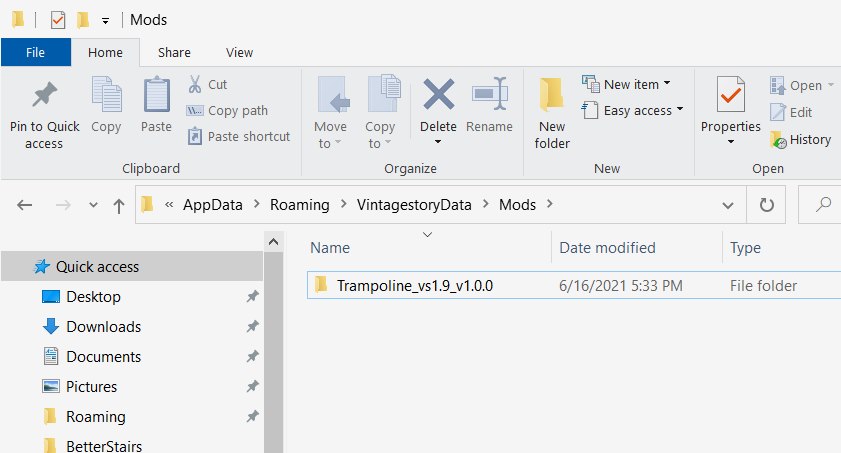

-
no animals were harmed Primitive Survival
Spear and Fang replied to Spear and Fang's topic in Mod Releases
Just a brief update that is somewhat related to the OP fishing - in the next release, everything related to catching fish will be customizable (frequency and odds). In addition, there will be configurable chunk based depletion/repletion rates for fish. -
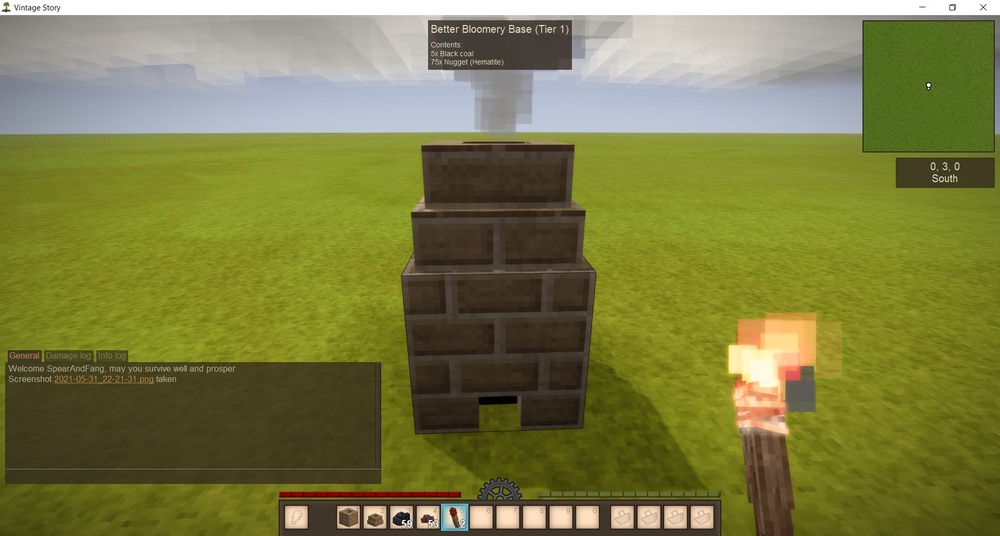
What did I change? More than I probably should have....sorry! Including some pretty irrelevant stuff at this point. I kept some notes: - added lang file (en.json) - added creative mode "Bloomeries" tab and assets to that tab (this just makes it easier to test in creative mode) - added -north to bbbase recipe output (and had to rework that output after rearranging variantgroups - see below) - removed game: prefix from some things, most notably behaviors - because it was throwing errors - rearranged variantgroups in betterbloomerybase and everything related to that (quite sure horizontalorientation has to be the last variant in order for that to work). It was certainly crashing the game prior to doing so. - not sure exactly what was preventing the code from working (needed to be in a src folder? class registrations not quite right? I don't know for sure) You'll see that I removed a bunch of code and tidied a bit up in order to simplifying troubleshooting and get things "functional" quickly. Obviously you've got a ways to go! With any luck you won't need a custom entity class for that base, but I didn't look at that code too closely. You *might* need a custom block class for the chimney in order to match tiers...maybe. Or just let players mix and match tiers when placing blocks, but prevent interaction with the base (in your existing base block class) if the chimney is the wrong tier...if you catch my meaning. FYI: When it's referencing .Code.Path in the c# code it's talking about the blocks json "code" (+ variants) i.e. "betterbloomerychimney-tier1" or "betterbloomerybase-tier1-north". BetterBloomeries2.7z
-
Your code is looking really good and nothing obvious stands out (other than a few minor things that likely need to be tidied up). Can you upload the entire mod so I can take it for a spin and maybe get a handle on what the problem is? PM it to me if you don't want to share it with the world.
-
Mod Development question
Spear and Fang replied to CorpseFactor's topic in [Legacy] Mods & Mod Development
I started with the modding section (bottom half) of the wiki. Worked through it pretty much end to end. Lots of info and good examples there. https://wiki.vintagestory.at/index.php?title=Main_Page -
Sorry I’m only on my phone for a couple days so I’ll be brief. If you use the original vanilla classes and place a vanilla chimney on top of your new bloomery base, does it work? I’d verify that first before testing your new class(es). Then focus on what the server-main.txt log is complaining about to work the bugs out of the new class
-
At a glance... You shouldn't need the game: in there, but looking at the BlockBloomery class I immediately came across this line: if (aboveBlock.Code.Path == "bloomerychimney") Which could be problematic for sure. It's expecting a block with the exact code path of "bloomerychimney". So the vanilla chimney. Anyways, you might have to make your own clones of the classes (BlockBloomery.cs and BEBloomery.cs) to make this work for you. https://github.com/search?q=org%3Aanegostudios+bloomery&type=code
-
no animals were harmed Primitive Survival
Spear and Fang replied to Spear and Fang's topic in Mod Releases
Yes, you can place rocks and then find worms under them. That’s the reason why the odds of finding something under them is so much lower (to minimize the cheese). You can’t place a stick or flint once you pick them up. -
no animals were harmed Primitive Survival
Spear and Fang replied to Spear and Fang's topic in Mod Releases
Side note: If you're just wanting to use them for fishing bait, then use something else: grain, berries, mushrooms, veggies, etc. -
no animals were harmed Primitive Survival
Spear and Fang replied to Spear and Fang's topic in Mod Releases
That's intriguing. During playtesting I was consistently finding one per real life minute when I focused my efforts entirely on finding earthworms. In my current survival world, I generally come home with 1/2 dozen every in game day that I'm out exploring (although I'm quickly running out of quality places to look). I've brought more than 100 home, although they eventually die off or escape. I'm starting to think that my temperature queries aren't always returning the correct temperature. I believe that there's a 20% chance of an earthworm being under a stick or piece of flint for example (if the other conditions are met) and a 5% chance with a regular stone. You'll never find a worm under a stone with minerals (i.e. quartz, copper). -
no animals were harmed Primitive Survival
Spear and Fang replied to Spear and Fang's topic in Mod Releases
It's a little tricky. Run around and pick up sticks and rocks (especially flint, but other rocks too) that are lying on a grassy surface (namely: soil). By pick up, you need to actually pick them up (like right click, NOT break them and pick them up). Also, the temperature needs to be between 0-30C. If all those conditions are met, you should find several worms under those sticks and rocks in short order! If you're hoping for even more earthworms, take @Quixjote's Richer Than Dirt mod for a spin, which will let you pan up worms o' plenty! https://mods.vintagestory.at/show/mod/326 -
Having seen this in action already, let me just say that this mod is a thing of beauty. Such attention to detail!
-
I'm assuming you've seen this, but if not... https://mods.vintagestory.at/show/mod/463




