

Brady_The
-
Posts
717 -
Joined
-
Last visited
-
Days Won
7
Content Type
Profiles
Forums
Blogs
News
Store
Everything posted by Brady_The
-
Listening to the Vintage Story Soundtrack - Latvia in particular
Brady_The replied to Bard the Shrimp's topic in Questions
The soundtrack is available here: https://lophi.bandcamp.com/album/vintage-story-ost. Currently it doesn't offer the newest version, though. A lot of music players (at least Media Player (Windows 11) and foobar2000 can) should be able to play .ogg files though, so you should be able to listen to the files that are shipped with the game. You can find those in \assets\survival\music.(By default found in %AppData%\Vintagestory\assets\survival\music.) -
The wiki has a very basic tutorial: https://wiki.vintagestory.at/Modding:Basic_Entity If you get stuck somewhere, looking at Vanilla or Mod creatures which are similar to yours should help. I personally haven't worked on entities, so I can't be too much help. To find information on how to make a creature harvestable, any Vanilla entity should do. To find information on how to make a creature tamable and milkable, Vanilla sheep entities should help. To make a creature shearable, you probably need https://mods.vintagestory.at/shearlib or https://mods.vintagestory.at/wool as a dependency to be able to reference wool items instead of creating them yourself. In the latter mod you should find examples on how to implement in the patches folder. To find information on how to make a creature equipable and ridable like an elk, look at the elk. (Making a creature equipable is a bit convoluted so the task could be considered somewhat daunting.) That said, you presented a long and ambitious feature list. I would start small and get the basic creature to work first. Then go from there and add more features. Godspeed!
-
Does Anyone know how to get rid of this window that popped up?
Brady_The replied to cerberus_of_ferrets's topic in Questions
Ctrl+F10 -
If people don't like the changes, they always have the option to install the inevitable 1.21 reversion mods.
-
It looks like https://mods.vintagestory.at/overhaullib is missing.
-
I only took a quick peek at the very first berry bushes I could find and neither had ripe fruits. Due to this small test sample I am not sure if it was just by random chance, a bug or if bushes simply don't spawn in bearing fruit. The latter would be very harsh. Edit: It could have also been a seasonal thing. I was skipping time pretty generously testing other things beforehand.
-
.pre4 just dropped. Changelog included: https://info.vintagestory.at/v1dot22#pre4 The list of newly added features is rather short, but the bush propagation sounds very interesting. It's going to make berry farming for easy food access a lot harder, but a number one complaint is that food is too easy in VS, so this should be a good change.
-
Wooden axle block that still behaves like a full block
Brady_The replied to Voxellian's topic in Suggestions
I feel that. The quern shouldn't require too much power. If it is not completely windless it should rotate. It might require more than one set of sails, though. I can't say that I have too much current gameplay experience. I am still waiting on some (content of some) mods to be updated to 1.21. -
Wooden axle block that still behaves like a full block
Brady_The replied to Voxellian's topic in Suggestions
You'll be happy to hear that in-wall axles will be a feature in 1.22. If you search for "Mechanical power upgrades" in it'll bring you right to a gif in which those are included. It's a bit harder pretty much impossible to see, but the two outer most gears are connected to axles. -
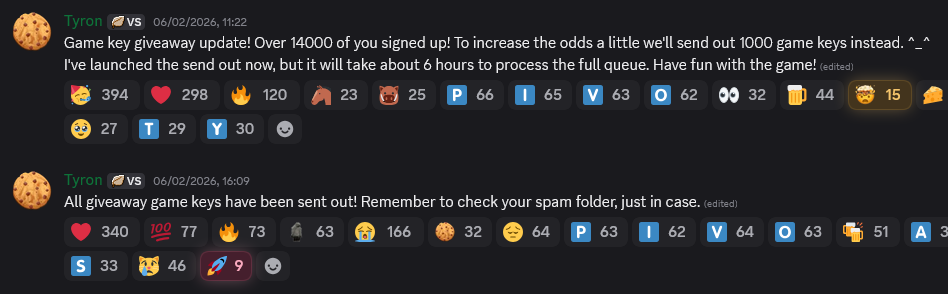
The keys were sent out just a couple of hours later.
-
Whoops, I completely misunderstood your problem. You seem to be right about your assumption regarding the planting being handled in ItemCattailRoot. https://github.com/anegostudios/vssurvivalmod/blob/2fdc2c37e5bbe1c92ce1314fe0b3e7c1576d42eb/Item/ItemCattailRoots.cs#L11 It should be fairly easy (well, at least I imagine it to be) to add your item via harmony patch, but for that you need at least some coding experience.
-
I believe the spawning of reeds is determined in assets\survival\worldgen\blockpatches\other.json. The whole plant is spawned (tallplant-coopersreed-land-normal-free) and on the right interaction is transformed into the root (tallplant-coopersreed-land-harvested-free) which then transforms into the whole plant again after a certain amount of time (reedpapyrus.json - transientPropsByType). That said, I am not a coder, so this is more of an educated guess.
-
Need help with game crashing within a few minutes of playing
Brady_The replied to R4nd0m_404's topic in Discussion
I'd think about creating an issue over at github.com/anegostudios/VintageStory-Issues/issues. It might be a hardware incompatibility. You could also share your server-main and client-main logs here, but I doubt somewhat that we (the players) will be able to help here much further. -
How do I expand my crafting abilities in this game?
Brady_The replied to gluemchen's topic in Discussion
This would be an interesting mod and would fit pretty nicely into the lore. The player wakes up from something after all and has not many memories of anything. -
"isFood": true in the root of the recipe will prevent the conversion into a dirty pot.
-
The crashes seem to be related to the newly supported tag feature in recipes in combination with some other keys. Take for example the mentioned Travertine tile. As a non-coder I assume that the game currently has trouble combining wildcard replacements like "allowedVariants, skipVariants" with the assets behind the tag.
-
I can't help you with Blender, but for VSMC I have this link to a 5-part-tutorial by ThenthArchitect: There's also this VSMC Community Edition which comes with a lot of quality of life changes and additions: https://github.com/Pure-Winter-hue/vsmodelcreator/tree/pw-vsmc-hard-winter-edition
-
In such cases mods like https://mods.vintagestory.at/cbr could be an option. I suppose you could consider it a cheat, because you are able to do some pretty crazy things with this particular mod, but at the end of the day it's entirely on you how you are going to utilise this mod - as a cheat or as a QOL mod that allows you to make nice liveable builds which wouldn't count as rooms because the game follows a programmatic logic.
-
Those are most likely caused by a rabbit. At least I found them responsible for collapsing whole cliff sides in my ocean world play-through. I haven't played a in a while, so I cannot say how well this mod works, but I'd give it a try.
-
It's not possible.
-
I doubt the water wheel construction is currently working. { code: "waterwheel", class: "BlockWaterwheel", entityClass: "Generic", entityBehaviors: [ { name: "Burning" }, { name: "MPWaterWheel" }, { name: "RightClickConstructable", properties: { brokenDropsRatio: 0.8, stages: [ { addElements: [ "MainOrigin/ORIGIN1WoodShaft", "MainOrigin/ORIGIN2Hubs" ] }, { requireStacks: [ { type: "block", name: "waterwheelbuilding-ingredient-supportbeams", code: "supportbeam-*", quantity: 16, storeWildCard: "wood" } ], addElements: ["MainOrigin/ORIGIN3Spokes"] }, { requireStacks: [ { type: "item", code: "plank-{wood}", quantity: 48 }, { type: "item", code: "resin", quantity: 4 } ], addElements: ["MainOrigin/ORIGIN4Rims"] }, { requireStacks: [ { type: "block", code: "supportbeam-{wood}", quantity: 16 }, { type: "item", code: "resin", quantity: 4 } ], addElements: ["MainOrigin/ORIGIN5Braces"] }, { requireStacks: [ { type: "item", code: "metalnailsandstrips-*", storeWildCard: "metal", quantity: 8 } ], addElements: ["MainOrigin/ORIGIN6NailsStrips"] }, { requireStacks: [ { type: "item", code: "plank-{wood}", quantity: 48 }, { type: "item", code: "resin", quantity: 4 } ], addElements: ["MainOrigin/ORIGIN7Paddles"] }, { requireStacks: [ ], actionLangCode: "Launch" } ], } }, ], [...]
-
That's a very interesting idea and would certainly add to the feeling of progression, while still being reasonably authentic in my opinion. If you spend all these resources on making high-tier metal heads, you certainly would want the weapon to be stable and reliable. Attributes I wouldn't necessarily apply to sticks.
-
Regarding weaving. There's this mod that could potentially fill the cloth-shaped hole in your heart: https://mods.vintagestory.at/show/mod/34327
-
You should be good. You have already gone a lot further than the vast majority of people who just rip and re-upload mods without zero regards given. No plaintiff, no judge.


