


Professor Dragon
-
Posts
709 -
Joined
-
Last visited
-
Days Won
3
Content Type
Profiles
Forums
Blogs
News
Store
Everything posted by Professor Dragon
-
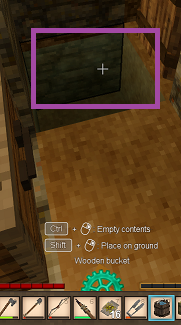
Ah, right. I think of that as "placing" water, not "emptying a bucket." Anyway, it's the same thing. If you have a hole, then <Tab> + right click in your case will create a water source block in the hole. Ttarget inside the hole with the crosshairs - side or bottom of the hole does not matter. The bucket will empty, and you will have created a water source block - which you can now use to refill your bucket. Emptying a bucket is the same thing. If you point with a full bucket at a water source, and do the same thing, then it will empty the bucket. Clear as water? Professor Dragon.
-
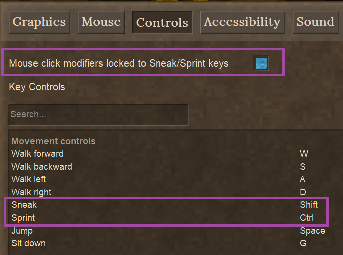
You need to have the cross-hairs aimed at a water source block before using <Tab> + right click. Otherwise, it will attempt to place the water on the ground. I have my buckets set to be <Cntrl> rather than <Tab>. Not sure if this is something that I've done - but it's different to what you have. Professor Dragon.
-
Thanks! Very useful. I've bookmarked this. I'd love to see that added as a Mod into the game. Oh wait, I see that there are already some attempts at this. Still, I love your webpage, multi-languages and especially the layout and presentation.
-
Fantastic! What values did you settle on? (I might need them soon )
-
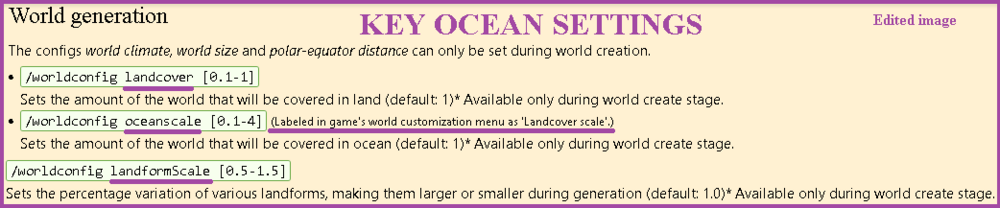
1) What are your other World Generation settings? You can see these before loading into the game with the "pencil icon" against your Save file. In particular, "landformScale" and "oceanscale." 2) Do you have mods that impact world generation? Such as Terra Prety. 3) Setting "landcover" to 40% means that 40% of your world will be covered by land, and 60% by oceans. This is a pretty "ocean heavy" setting. Some amazing person has put a table on the World Generation page showing the different effects of land settings. Professor Dragon.
-
Of course you do. Huh. I did not know that Redwoods came in forests. Obviously I need to travel more, as I've only seen them singly. You learn something new every day. Professor Dragon.
-
Ooooh Boy - did you choose a TOUGH ASSIGNMENT?! You can only get Redwood Logs by cutting the Redwood "Branches" (a bit like a fruit tree in that regard). Cutting the main trunk will produce quarter logs. Not only that, but Redwood Trees are uncommon, and the seed drop is low. So, best of luck with that boat! I thought I was being special by choosing Larch. Oh well - at least you didn't choose Ebony. You may be able to find a mod that converts Redwood quarter logs to regular logs. I don't know what is current though or works on the current version. This is an example though. If you want a wood with a reddish/orange tinge that is much easier to obtain, then try regular Pine. Professor Dragon.
-
This won't help, as you don't have any of these trees either, but you can also use acacia logs instead of oak for leatherworking. Acacia are a LOT further south though than the trees you mentioned, typically. I will note that oaks are not particularly hard to find, usually. Do not go wandering into forests if you are not prepared to be jumped by wolves. Stick to the outside looking at the treeline, or nice open plains. This answer actually best covers it - you do simply need to travel more, and keep an eye on the trees. In particular, you may want to travel south, as it gets a bit warmer as you go, on a default start. If you're seeing larch, you're in a cold place and could move either to a lower elevation or south. I like @Redforge pictures as well - at least you'll know what to look for. You might also find an Agriculture Trader and be able to buy an acorn or two. You only need one to grow, and then you can break the leaves and be right from that point onwards, as you usually get at least one and usually more from a tree. (I'd still buy a few though.) Finally, at worldgen some truly massive oaks are generated. These are never generated again, and your seeds will never produce a tree as big. So as tempting as it may be, I tend to leave these trees and look for their smaller cousins. They're normally in the same area. Professor Dragon.
-

Clay is a mineral. Can we put it in the mining bag please?
Professor Dragon replied to Sam Morris's topic in Suggestions
I'd love a bag that not only holds clay, but dirt as well. I don't mind if we have to craft a separate bag to the current mining bags - just let me be able to carry large amounts of dirt (and clay, sand and gravel) please. Although it wouldn't be too bad if one bag did both ores and clay/dirt - because it is a rare mining expedition indeed where you don't get dirt as well as ores, especially with "falling blocks" enabled. -
I'm disappointed by the bottom and top roof shapes
Professor Dragon replied to Johnny Blood's topic in Questions
So it's just me breaking and replacing the roof tile block to get the correct orientation? Okay then . . . (Hmmm. Maybe that wrench mod would overcome a lot of placement issues. . . ) -
I'm disappointed by the bottom and top roof shapes
Professor Dragon replied to Johnny Blood's topic in Questions
I thought exactly the same thing! This is THE ANSWER to most roof questions. I know what you mean. I guess you could use the peaks for a ridgeline on a block line on your roof - but why do you have a block line on your roof? Spanish influence, maybe? I gave them a real good try to incorporate them, but even when I wanted an overhang, the existing slanted roof did the job better than the low flat roof. Why there is no connectivity between the parts I don't know. Now, if they formed part of a low slanted roof, I could get behind that. Overall, these roof parts look like they should do a lot more than they do. @Johnny Blood summed it up well. -
Journey to the End of the World (South) / Viaje al fin del mundo (Sur)
Professor Dragon replied to spasmos's topic in Story
Amazing! I'm lost for words. That's a real achievement. Well done, @spasmos! Professor Dragon -
I believe that you can make these with the metal spikes recovered from Locust Nests in the base game. And pitfall traps are also vanilla, being just big holes in the ground. But yeah, what those other two said
-
Hello @Monty B I'm curious how you went with this: Did the extra light stop the spawns? Did you end up installing a mod to reduce/eliminate monsters spawns? What TYPE of monsters are spawning? Are they "Surface <X>" mobs, or "Deep <X>" mobs? eg Surface Drifter. Do you see or hear any Rifts close by? If the problem is still occurring, seeing a screenshot of the inside would help. The issue sounded like a simple "Not enough light" scenario, which is resolved early game as has been noted already, by fat lamps, candles torches, and eventually lanterns and chandeliers. Early game houses are constrained heavily by having available light. The only ways around that are: Install a mod in order to reduce monster spawns, such as the one that @LadyWYT recommended. If that doesn't work for you, there are plenty more at the mods database. Disabling lore content, which unfortunately also disables structures and story as well as monsters. I just wanted to call out one thing, so you don't feel that you have to keep doing it, and that is it doesn't matter what surface you build with. People used to try and cheese the spawning mechanics by placing down rocks and so forth, but that doesn't work anymore. It is LIGHT that you need to control Spawning with. So, no need to replace the floor, unless you are doing it for aesthetics. Specifically, enough light prevents (or should prevent) monster spawning when it is not a Temporal Storm. During a Temporal Storm (the screen changes colour to sepia), all bets are off. Anything can spawn anywhere. There are no safe spots - although there are ways to minimise the issues. This is where a mod such as "Easy Light Levels" or "Spawn Highlight" or similar is a wonder. No more counting gaps between torches - just flick it on, confirm the room is lit up, and then flick it off again. I use Easy Light Levels on the current verion 1.21.5 and it works fine. If you are still getting spawns when there is enough light, something else is going on, such as you getting Deep monster spawns from a nearby cave or a Rift or something. I am assuming that you are on a current version and not using mods. For reference, have a look at the file "drifter.json" under your install location ". . . \assets\survival\entities\lore". The spawn conditions are laid out there: spawnconditions: { . . . maxLightLevel: 7, lightLevelType: "OnlyBlockLight", . . . insideBlockCodes: ["air", "tallgrass-*", "loosestones-*"], Note that the only conditions it checks for is the light level and what block it can spawn in. And given that "air" is one of them, that means pretty much anywhere there is sufficient space. You'll also see that "loosestones" is mentioned, which prevents the exploit that people used, and "tallgrass" as that grows on dirt inside huts. This is what most of the mods that disable monster spawns are working off - they are changing these conditions. Most commonly the "maxLightLevel" command to 0 or 1. You could do it yourself if you wished if one of the off-the-shelf mods wasn't what you wanted - although I'd recommend you backup your main world, and experiment on a test world. Now, to get back to the title of your post and the original suggestion I really like this idea. I agree that there should be an Option where there are no monster spawns allowed in "Rooms". People could leave it off if they are fine with finding Drifters in their basement if they didn't get the lighting right. And/or there could be a tighter "No spawning in radius of player" and/or "No spawning while player is asleep in a bed". All of these I think would improve appeal. It is catering for the body of players who come from Minecraft where there are similar mechanics. You can always take the training wheels off later. That being said, there has been no sign that is the direction that the game developers are taking. It is very much "Here is Lovecraftian Horror, and it doesn't bend to your whims." THE LONG AND THE SHORT OF IT, is that it should be an "easy" early game challenge to overcome Drifters in your house. It is expected behaviour if the room is not lit properly. However, if the room is lit, then looking into why is in order. This has been an interesting post. I hope the above helps. Professor Dragon.
-
Did @Sorcerer and @DrFizzles sort this out? If not, please try raising a Support ticket here - and let us know the outcome https://www.vintagestory.at/support/ Professor Dragon.
-
Hello Akin, Welcome to the VS Forums. I see that there is no response. I don't have experience with Multiplayer, so I'm going to recommend that you also try posting this question out to the Vintage Story Discord server. It has a specific section for Multiplayer there, and you might get more of a response. https://discord.com/invite/vintagestory Oh, and let me know how you go - it sounds interesting! Professor Dragon.

-
Yes, try logging in to that first at Client Downloads under https://account.vintagestory.at/ And if that fails, use the "Need Help?" link below on the same page to access Support. They're pretty good.

-
question Mouse only works in windowed mode
Professor Dragon replied to Angry_Bones's topic in Questions
Try checking these: https://github.com/anegostudios/VintageStory-Issues/issues/5100 And the "Always on Top" setting mentioned here: Professor Dragon. -
Hello Narg, The key point that many people get wrong about lightning protection: Minecraft - place a lightning rod on a wooden house and you're right. Lightning gets attracted to it, and wooden structures immediately around are fine. Vintage Story - place your lightning rod on a non-burning block (eg stone wall, stone blocks) high above (or next to) your structure. It protects in a pyramid/cone (roughly) down. Putting a lightning rod immediately above your house is just asking for it to be burnt down. The cause will be the lightning striking a few blocks out horizontally to another wooden block. So you'll have a nicely protected lightning rod, and a burnt house. As a bonus, you'll be struck by lightning inside your house at the far end for half your health. (Every Vintarian has an opportunity to join special clubs "My house burnt down by a pit kiln", "My peat area burnt and consumed my house", "Lightning destroyed my home and/or killed my chickens" and "I got hit by lightning while in my underground cellar.") I'm not sure. I THINK (but could be wrong): * The fire damage is always against the block it strikes, and then can spread. * The lightning damage to players/animals is in the radius. But if you have a lightning rod, then you are protected if you are in its protection area (not above or to the side). I haven't found a way to summon lightning (doesn't mean there isn't one). If lightning does occur, it strikes at random in an area based off weather and height and some things. So calling to an individual block is unlikely. You can however go into Creative mode, force the weather to be stormy, build in a high place, make sure that the commands to allow lightning and fire damage are on, and test. Sorry it's not easier. For practical purposes, you may (for now) wish to put your lightning rod on stone wall blocks - they're like a pillar - high enough to get protections, as per here: https://wiki.vintagestory.at/Lightning_rod And this thread: Actually, for really practical purposes, I turn lightning and fire spread off with commands. After having them on for a while, it "Just Wasn't Worth It" YMMV /worldconfig lightningFires false /serverconfig allowfirespread false If you wish to dive into the code, start here and work out: https://github.com/anegostudios/vssurvivalmod/blob/ac9a0059d84ca3449f066f26b5ee6b47bc9ce76a/BlockEntityBehavior/BEBehaviorAttractsLightning.cs Hello @Christian Lewis - did you ever find out if this was possible to summon lightning to a specifc spot? My apologies that I don't have a direct answer. Professor Dragon.
-
It was introduced in v1.21.0. Feature: Monster autoharvest! The falx now extracts 1 drop per hit with a 25% chance from drifters, shivers and bowtorns (overall drop rate remains unchanged). There is a reason a falx blade is curved! Professor Dragon.
-
Hello shakra, You've got two points in here, that are not necessarily connected. Q1) How to make leaf blocks square? Q2) How to improve performance with leaf blocks? A1) With the exception of Berry Bushes, you can NOT make regular leaf blocks square like in Minecraft, in vanilla. At least, I don't think that they have an attribute for that. You can make Berry Bushes square by right clicking with Shears. They'll come back bushy though if you harvest the berries. I don't know much about mods to change leaf block shape. I didn't find many on a real quick search. It looks like this one has some square leaf blocks, but it is outdated: https://mods.vintagestory.at/buildersblocks A2) It is important to remember that leaf blocks act a little differently in Vintage Story as they are transparent blocks with overlap, so rendering in a forest may have a performance hit. You'd be better to address performance issues in general. You could always test having a huge number of fluffy berry bushes in Creative, and then Shear the lot and see how big the performance impact is, if any. There is a setting called "Waving Foliage" which you could try disabling. https://wiki.vintagestory.at/Settings From another post on this question (my emphasis): However, check out the other FPS impact hitters on that page. Also, a lower View Distance may help if you are in a forest - you won't be seeing far anyway. Some people chop down trees. Check out this: https://wiki.vintagestory.at/Framerate_and_Performance Hope that helps. Professor Dragon.

-
I've always wondered why an anvil with a Helve Hammer positioned above it does NOT default to ONLY giving you Helve Hammer recipes. It makes sense to me. Otherwise, it looks like you can make things with a Helve Hammer that you really can't. SUGGESTION: Add an "F" tool to the Anvil which lets you switch between "Helve Hammer ONLY recipes" and "All recipes."
-
Automation issue - any way to prevent lazy hoppers?
Professor Dragon replied to Jacsmac's topic in Questions
This is FANTASTIC testing. Nice job! You've confirmed good single player results after blocking in the hopper, and nailed down the loss issue to the multiplayer one that @radfast mentioned they would work on: It would be great if you could make an account on the Issue Tracker (after updating to 1.21.5 or whichever is the current latest release) and putting those same results in a comment against that thread. It would be great to show that it is a confirmed issue, experienced by more than the original poster. Professor Dragon.
-
Does rain or snow halt progress on a Beehive Kiln?
Professor Dragon replied to Professor Dragon's topic in Questions
Yes, this puts it in the realm of early game! It just needs fireclay and any fuel source such as firewood, peat or coal. https://wiki.vintagestory.at/Beehive_kiln/draft#Fuel_Efficiency If I had truly appreciated this, I would have built my Beehive Kiln BEFORE my THREE Cementation Furnaces, because then I wouldn't have fired all of those refractory bricks in pit kilns. I had it stuck in my head that a Beehive Kiln was a "late game' item and that I should get steel first. Another lesson learned. Besides, the coloured ceramics is really where it is at for me, so I just can't believe now (after the event) that I didn't do it sooner. It's a bit of a monster to keep stacked with ceramics and fuel though. Professor Dragon. -
Does rain or snow halt progress on a Beehive Kiln?
Professor Dragon replied to Professor Dragon's topic in Questions
Thanks for the advice. Yes, the Beehive Kiln works marvelously with peat bricks. And, unlike charcoal, burning stacks don't fall over. The inside hole definitely lets rain and snow through. Thank you. I appreciated the details. Definitely nine squares with 24 peat in each. I lit the front three rows, rather than load and light. The progress indicator ticked off and was moving along nicely. I'm guessing that my very full load of the Beehive Kiln simply exhausted the fuel while I wasn't paying attention. I used the falling block technique to triple stack Storage Vessels and large flowerpots, along with some floor to ceiling shingle stacks, but that looks like it was being too greedy for the fuel supplied. I'll fuel up and give it another go. Maybe I should just not skimp out and stack it with 32 peat bricks, but I was trying to econimise. Oh well - lesson learned! Good to know it wasn't the rain - although I'm going to keep an eye out on that "Just in Case", however unlikely. At some point I'll test if you can block the chimney. I think I read somewhere that does halt the Beehive Kiln functioning, but perhaps a block above the kiln or two blocks above would not. Back to coloured ceramic production. Thanks both, Professor Dragon.




